It can be said that since the November edition of the Advanced In-The-Wild Malware Test 2025, cyberspace has not slowed down even for a moment. The threat landscape is changing rapidly, and cybercriminals are refining their techniques at a pace that forces both security vendors and the laboratories testing their effectiveness to remain constantly alert.
In response to these realities, we have already expanded our methodology and the way we communicate results. In a nutshell, the providers of the tested solutions receive a more detailed and transparent picture of what really happens during an attack on the system in the form of enhanced logs with the full context of the infected system’s activities.
In practice, this means the ability to trace the entire history of an incident: from dependencies between processes, through file and registry operations, executed commands, network connections, and Command and Control server activity, to the smallest signals that might have previously gone unnoticed. Such transparency allows manufacturers to respond faster, develop their technologies more effectively, and identify vulnerabilities before cybercriminals exploit them.
Extended events logging in Windows for malware and security software
The extended action logging introduced in Windows for malware and security suite allows for detailed tracking of the full launch path, where we can distinguish:
- process initialization,
- file operations,
- registry operations,
- DLL operations,
- network communication,
- overall behavior in real time.
This allows us to precisely distinguish between malicious activity and defensive responses and capture nuances that were previously invisible in traditional logs.
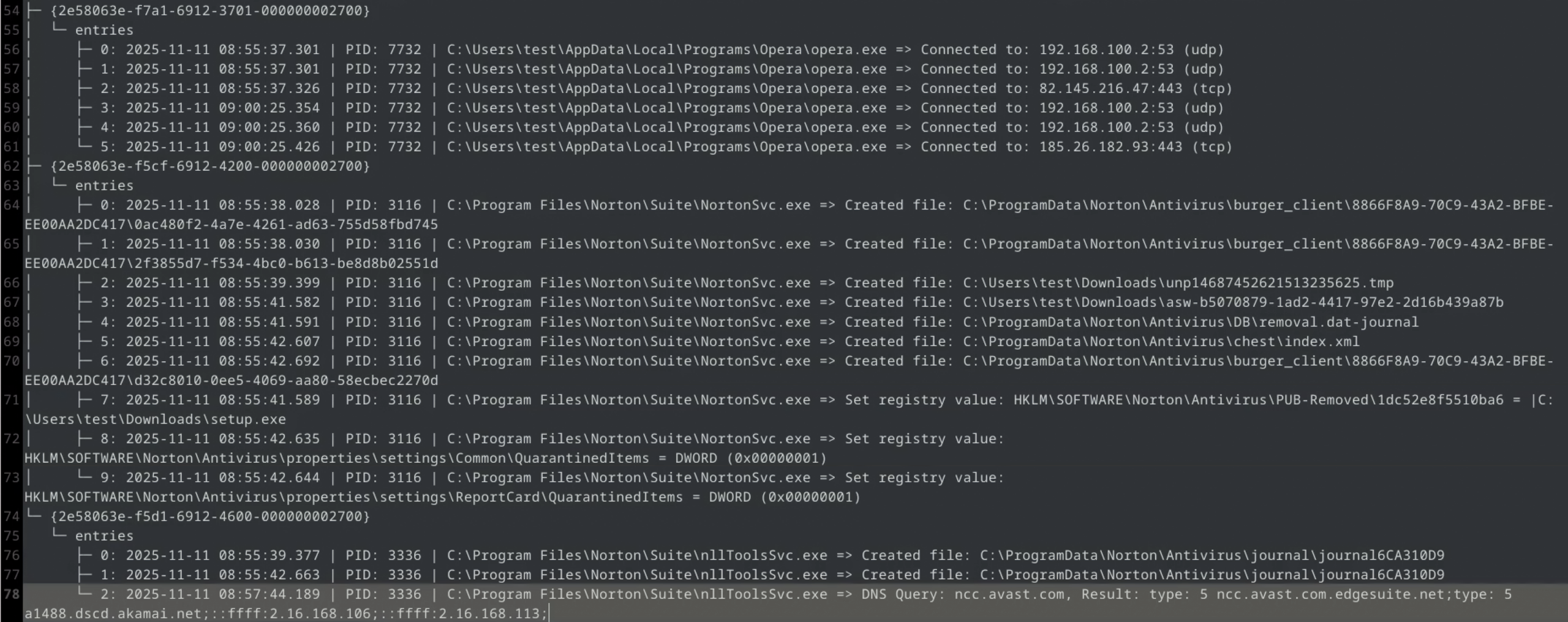
The screenshot below shows an example of Norton Antivirus behavior, which, upon detecting an unknown file, initiates its transfer to Threat Labs, then receives the analysis result and automatically moves the threat to quarantine.
Our logs are generated by Sysmon and supplemented with graphical screenshots processed by an OCR tool (Tesseract). They allow us to faithfully recreate everything step by step. As a result, vendors receive not only raw telemetry data, but also a complete picture of the course of events, which facilitates the diagnosis of their products’ behavior in real-world conditions:
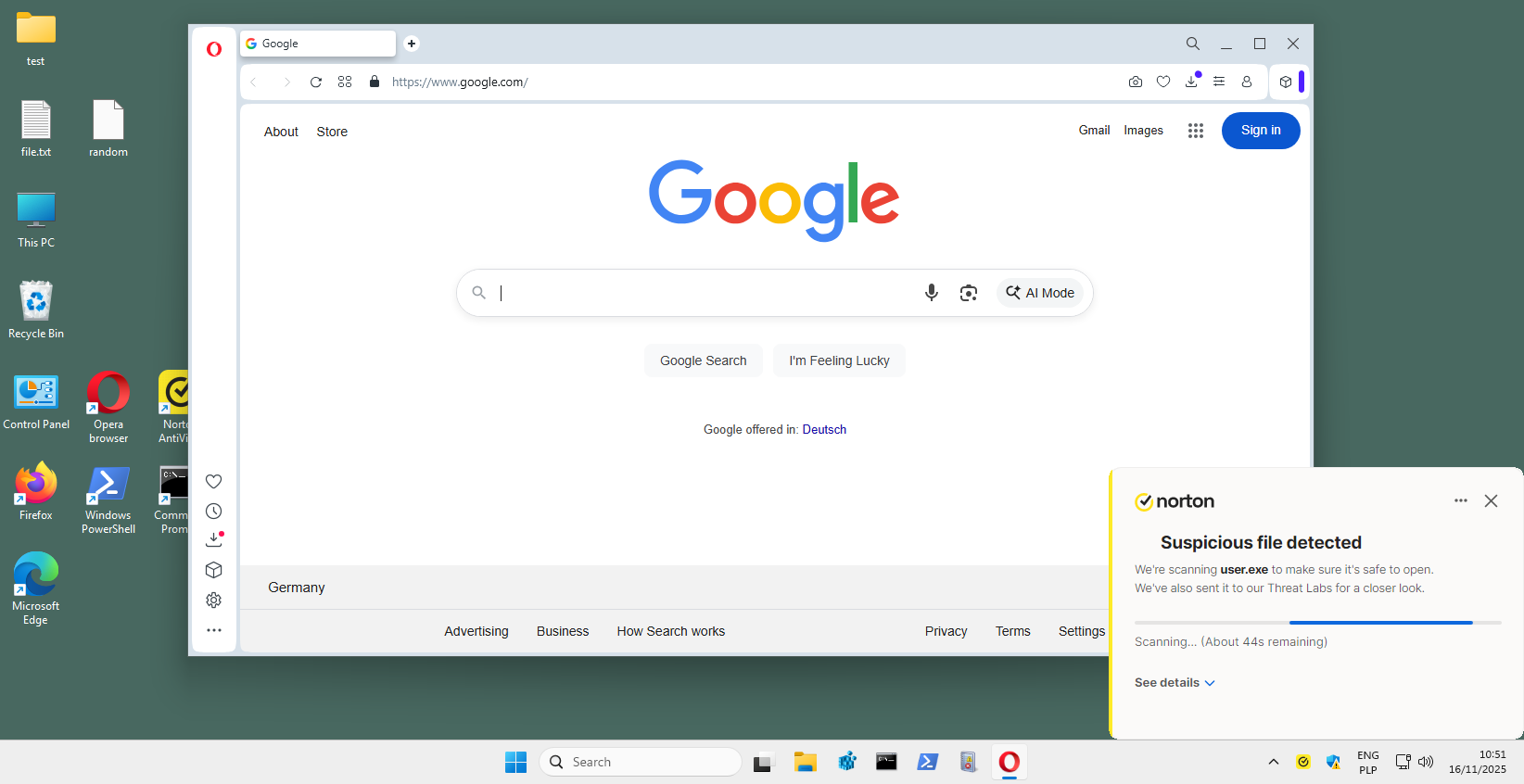
Below, we present a graphical representation of the events associated with the above logs. Using the hypervisor API, we take precise screenshots at the moment of detection, which allows us to capture the full course of the security product’s response. In this case, the unknown file “user.exe” is automatically sent to Norton Threat Labs, where it is classified as a threat based on the response and moved to quarantine.
In general, we are also closely monitoring the upcoming requirements of the Windows ecosystem. Microsoft’s work on the new AV-EDR platform as part of the Windows Resiliency Initiative is still ongoing, so we are monitoring it closely and will adapt our testing infrastructure as soon as it begins to have a real impact on testing practices and vendor solution integration.
Changes included to the test from November 2025
New: We have begun the process of migrating the Windows 11 test environment to the latest version, 25H2 Pro. Most security solutions will be gradually transferred to this version of the system. Some products are still running on earlier Windows builds and will only be fully migrated from January 2026. To ensure stable implementation, it is necessary to refine the tools and automation mechanisms that work with individual products, which is why the process has not been carried out simultaneously for all solutions.
New: After consulting with several vendors, we have decided to change the browser used in testing. Firefox has been replaced by Opera, which is based on the Chromium engine. Opera ensures full compatibility with modern web technologies and, at the same time (unlike other Chromium-based browsers), continues to use the system file save window (“Save as”). This is a key feature that allows us to perform fully automated, non-invasive sampling in a Windows environment.
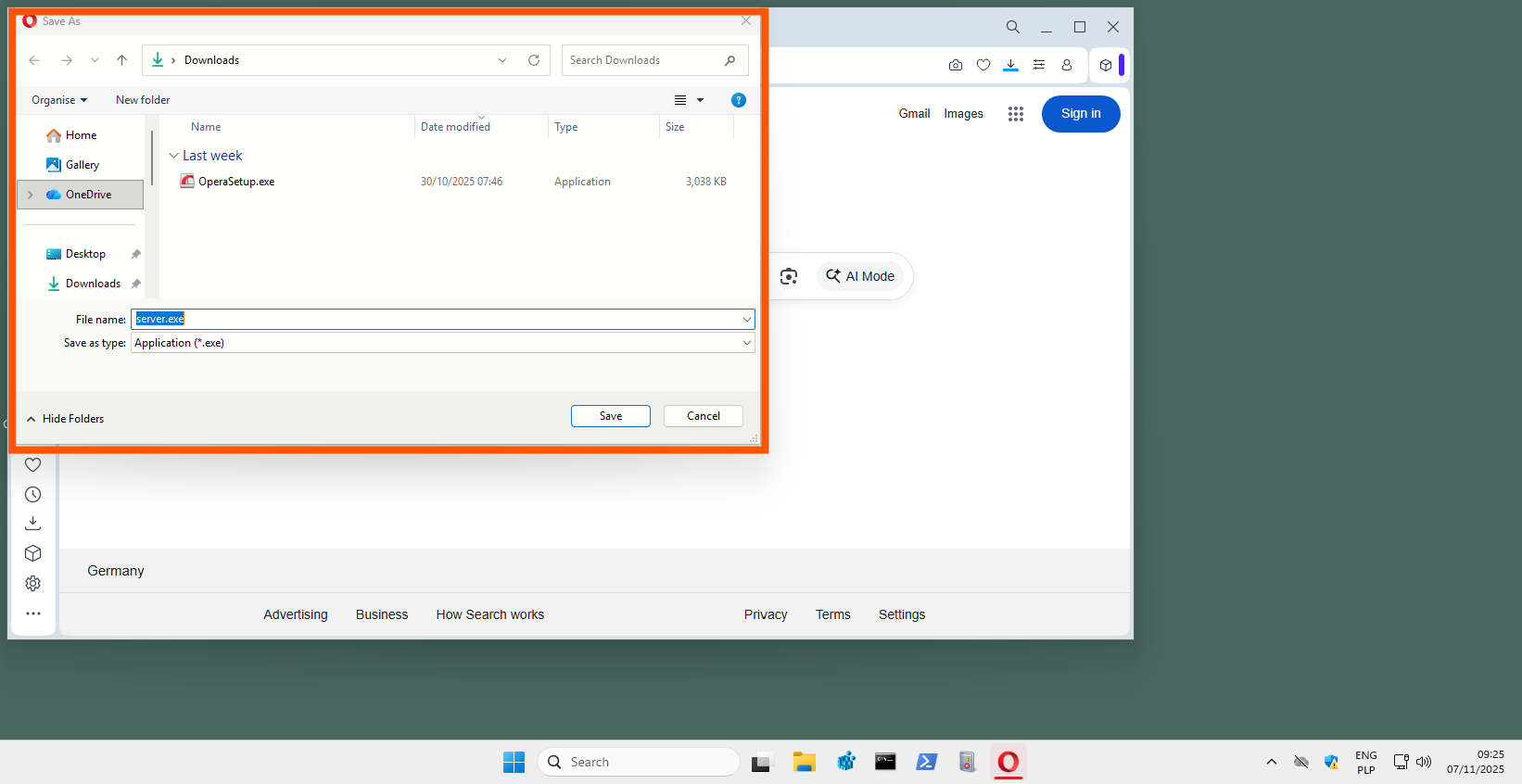
Unlike Google Chrome, Microsoft Edge, or Brave, which integrate their own download managers into the HTML interface, Opera retains the native Windows dialog. This ensures that the download automation process runs stably and predictably, without the need for additional workarounds.
Switching to Opera does not affect the quality of analysis or the effectiveness of automation. Opera uses the same Chromium engine as Chrome, Edge, and Brave, maintaining full compatibility with security vendors’ extensions, while allowing precise control over the process of downloading malware to the test environment.
What's new for LOLBins and TTP (November 2025)?
When it comes to LOLBins, it is crucial not to treat them as a catalog of potential system tools for attacking “just in case.” In our tests, we only include binaries and techniques that have been clearly confirmed in recent in-the-wild campaigns and described in technical reports by various researchers. Only on this basis do we expand the scope of monitored processes and TTPs. This approach allows us to keep our methodology in line with real attack trends and ensures that the solutions we test are up against actual threats, not theoretical scenarios.
In the November edition, we observe both processes related to LOLBins techniques and key areas of the Windows registry modified by malware in real campaigns. We are currently monitoring over 70 confirmed binaries used in living-off-the-land techniques: from classic administrative tools and script hosts to cloud processes, data transfer modules, and system components that have appeared in researchers’ technical analyses in recent months.
Categories of monitored processes (over 70 LOLBins):
- Utility applications + sync + dev
- Browsers and WebView components
- Interpreters and script hosts
- Windows Update + Windows Sandbox
- Administrative tools
- Data transfer modules (download + exfil)
- Proxies and tunneling
- DLL and COM loaders
- System processes and service hosts
- Network tools (recon)
- Suspicious entries + custom rules
At the same time, we track over 70 critical registry keys related to persistence (Run, RunOnce, IFEO, AppInit_DLLs, Winlogon), service and firewall configuration changes, shell and file class manipulation, network settings and certificates, and environment fingerprinting. Such extensive monitoring allows us to precisely distinguish between normal user behavior and activities typical of modern in-the-wild campaigns and provides the full analytical context necessary to evaluate the response of security products to real threats.
System and test environment updates
All web components, including browsers and their modules, run on the latest, regularly updated versions. This ensures that the test environment reflects real-world conditions. In this edition, we have also replaced Firefox with the Chromium-based Opera browser.
Test results from November 2025
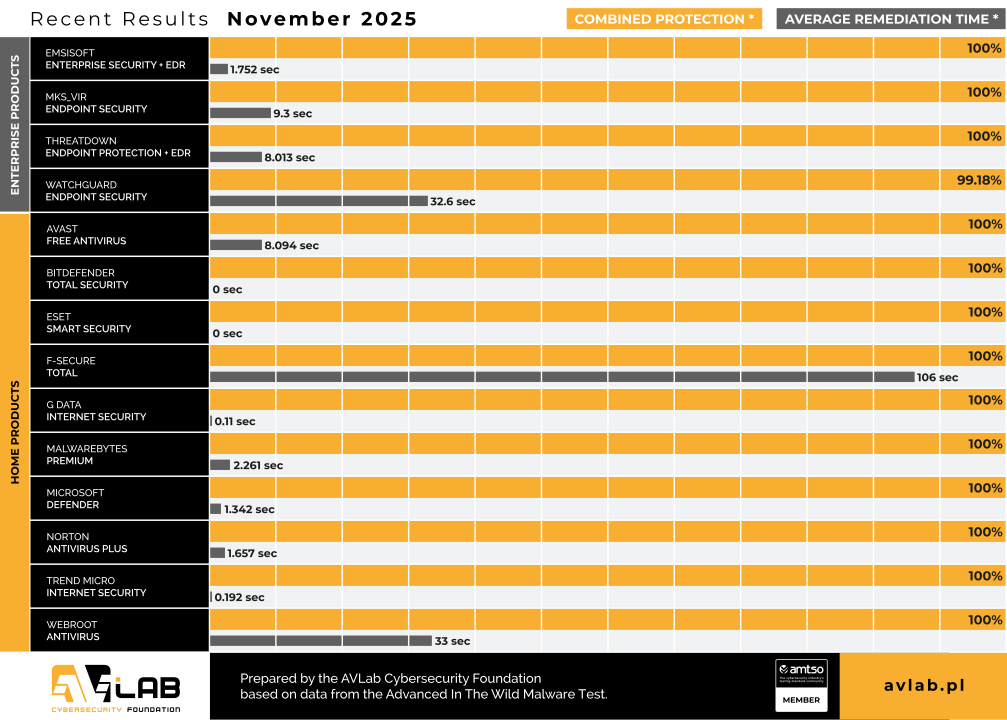
During this edition, all tested products operated in fully functional configurations, with active Internet access and all modules responsible for analyzing and verifying downloaded files. As a result, the assessment reflects how security solutions work in a normal, everyday user scenario.
Software developers use different defense strategies: some block the downloaded file at the browser level until the reputation analysis is complete, while others monitor rare files and only make a decision after detecting signs of malicious activity (communication with the C&C server, changes to the system registry, creation of files in temporary directories).
The Advanced In-The-Wild Malware Test series presents the actual detection of threats downloaded from the Internet. However, it is worth remembering that effectiveness may differ when malware enters the system through other channels, such as email, instant messaging, mobile devices, or network resources.
Each case in which the product failed to block a threat was described in detail and reported to the software developer in an individual report.
Solutions tested in November 2025
In the November edition of Advanced In-The-Wild Malware Test, we tested several security solutions for Windows, both consumer and business products, representing different approaches to threat analysis: from traditional antivirus software with a signature engine to integrated EDR-XDR platforms with behavioral and cloud analysis.
Information about environment configuration
What settings do we use?
During testing, we always run all available protection modules, including:
- real-time scanning,
- reputation mechanisms and cloud analytics,
- network traffic control,
- behavioral analysis,
- EDR-XDR modules,
- if possible, a dedicated security extension for your browser, which plays a key role in blocking threats from the Internet.
Policy toward PUP/PUA
Although we do not use PUP/PUA samples (i.e., potentially unwanted but not necessarily malicious applications) in our tests, we recommend enabling protection against this type of software as well. This feature allows you to block applications that interfere with the operation of your system or browser, even if they are not considered classic malware. We always activate the PUP/PUA protection option in all tested products.
Incident response and activity logging
We configure each product so that, if its capabilities allow, it automatically responds to threats: blocking suspicious activity, removing malicious files, or restoring modified system components. All these operations are recorded in detail and analyzed by our dedicated software, which allows us to correlate events such as file blocking, process isolation, or registry entry cleaning.
Transparency and product configuration
The default settings of most solutions are robust, but they do not always provide the maximum level of protection. That is why we report every change in product configuration, both those that increase the level of security and those that result directly from the developers’ recommendations. It is worth noting that some tools do not offer additional options, so it is not always necessary or possible to modify the settings.
Enterprise Solutions

Emsisoft Enterprise Security + EDR
Default settings + automatic PUP repair + EDR + Rollback + browser protection

mks_vir Endpoint Security + EDR
Extended http/https scanning enabled + browser protection + EDR

ThreatDown Endpoint Protection + EDR
Default settings + browser protection + EDR

WatchGuard Endpoint Security
Default settings + browser protection
Solutions for Consumers and Small Business

Avast Free Antivirus
Default settings + automatic PUP repair + browser protection

Bitdefender Total Security
Default settings + browser protection

Eset Smart Security
Default settings + browser protection

F-Secure Total
Default settings + browser protection

G Data Internet Security
Default settings + browser protection

Malwarebytes Premium
Default settings + browser protection

Microsoft Defender
Default settings + “Block at First Sight” + “MAPS” enabled

Norton Antivirus Plus
Default settings + browser protection

Trend Micro Internet Security
Default settings + browser protection

Webroot Antivirus
Default settings + browser protection
The November tests covered 14 security solutions designed for both home users and businesses. Our observations show that:
Pre-execution effectiveness increased slightly for all manufacturers. This is primarily due to the high proportion of derivative threats based on well-known malware families, which are easier to block before they are launched.
There were more pronounced differences in the post-execution results. Some solutions still have difficulty detecting more advanced techniques, such as in-memory, fileless, or living-off-the-cloud attacks.
Remediation Time is becoming an important evaluation parameter. In addition, products offering automatic response (e.g., rollback, state restoration) can achieve better protection results. On the other hand, in some solutions, detection only occurs when attempts are made to communicate with C&C servers, which means that the threat operates in the system for several dozen seconds or several minutes. This is not a disadvantage, but a characteristic feature of a given protection architecture.
Recommendations for users and administrators
It is crucial to choose solutions with robust behavioral analysis, automatic rollback, and extensive telemetry. At the same time, it is worth using network segmentation and access restrictions to minimize the effects of possible incidents.
Advanced In-The-Wild Malware Test
How do we evaluate and how long does the cycle take?
We conduct six editions of the test throughout the year, and each of them contributes its results to a comprehensive annual summary, during which we highlight the most effective protection solutions. Each edition includes the evaluation of products for home users and businesses, with an emphasis on three key stages of confrontation with threats:

PRE_EXECUTION
We assess whether the threat was identified and blocked at an early stage, before it was even launched. This may include blocking the website, blocking the downloaded file, or blocking the attempt to save the file when first accessing it.

POST_EXECUTION
We check whether malware that has been downloaded and executed on the system has been detected and stopped during more advanced analysis. This stage simulates the most dangerous scenario, i.e., a zero-day attack in which the malware has already been executed by the user.

REMEDIATION TIME
We measure the time that elapses from the moment a threat appears in the system to its complete removal and repair of the effects of the incident. This parameter is closely related to the previous ones and allows us to assess how quickly and effectively the software deals with eliminating threats.
Purpose and scope of the test
We conduct the Advanced In-The-Wild Malware Test six times a year. Each edition checks how security solutions cope with detecting and blocking active threats in the Windows 11 environment. The test focuses on real campaigns observed on the internet, which allows us to identify the strengths and weaknesses of the tested products when faced with current attack techniques.
At the same time, we collect telemetry data that allows us to analyze the current threat landscape, including new infection methods and tactics used in targeted and mass attacks. This allows us not only to assess the effectiveness of protection, but also to track the evolution of tools and techniques used by cybercriminals.
About AVLab Cybersecurity Foundation
AVLab Cybersecurity Foundation is a respected organization operating within AMTSO (Anti-Malware Testing Standards Organization) and Microsoft Virus Initiative (MVI). It specializes in improving digital security through detailed testing and analysis of security solutions. AVLab experts use advanced and realistic methods to evaluate the effectiveness of security software in real-world threat conditions. The organization regularly updates its testing protocols, providing reliable and valuable cybersecurity reports that help both individual users and businesses make informed decisions about protecting their systems.
Advanced In-The-Wild Malware Test