Analysis of modules for protection of online banking and payments – 2026 edition
13 January 2026
Most modern antivirus programs for Windows 10, Windows 11, and macOS offer basic protection for online banking and payments as standard. This usually includes anti-phishing and anti-malware mechanisms, protection against keyloggers and screenloggers, blocking untrusted applications and scripts, and detecting unauthorized changes to DNS settings. However, some manufacturers go a step further by implementing dedicated modules that secure the operating system during online payments and other sensitive and confidential operations.
Special modules for online payments have been designed to protect users’ finances and personal data from cybercrime. They increase the level of security of electronic banking and online transactions. Using solutions recommended by the AVLab Foundation for Cybersecurity significantly reduces the risk of a successful cyberattack.
Test introduction
The main objective of the test was to assess the effectiveness of dedicated online banking protection modules in securing users against attacks, regardless of the protocol or initial vector used. To this end, malware was developed and scenarios were simulated in which the attacker attempted to steal data from a system protected by active antivirus software, with online banking protection mode enabled. In cases where the dedicated mode was not available, the full capabilities of the solution were used through an appropriately customized configuration.
In Windows system, threats were delivered via the Telegram messenger. The scenario involved sending the victim a malicious file posing as a trusted application from a “friend contact,” such as a supposed beta version of a game. Such attacks can be carried out using any messenger and allow bypassing the browser and some of the basic protection mechanisms, which provides a more realistic assessment of the interaction between malware and the security technologies used.
Methodology
The testing methodology was developed in accordance with the guidelines of the Anti-Malware Testing Standards Organisation (AMTSO)*, which ensures equal treatment of all manufacturers and allows them to verify the results based on the logs provided.
All tests were performed on a computer running Windows 11 25H2, with default or enhanced settings enabled. This configuration reflects an environment typically found in home and office settings.
Malicious files were delivered to the system using various attack vectors, including popular instant messengers and less common protocols, which distinguishes this scenario from infections carried out exclusively through a browser or email. With banking mode active or the browser running in the background, the task of the tested solutions was to detect and stop the attack at any stage – before it started, during, or after establishing communication with the server controlled by the attacker.
The test scenario used included the following stages:
1.
Attempt to inject and launch malicious software on the system, with an antivirus solution running in the background, configured to default settings or according to the configuration described in the final report.
2.
Activation of the online payment protection module. Depending on the solution being tested, protection was activated automatically upon entering the bank's website or manually by the user. In the absence of a dedicated secure environment, the Opera browser and online banking website were used.
3.
Observation of the response of the protection solution and the scope of information that could potentially be obtained by an attacker. This stage was repeated for all test scenarios.
4.
Drawing conclusions and evaluating the product based on the results obtained.
Overview of test scenarios
The .NET language was used to simulate malware behavior. The tools developed imitated techniques used by malware, such as keylogging, clipboard manipulation, screen capture, and sending data and logs to a server controlled by testers, which allowed the correctness of the simulated attacks to be confirmed. During this time, antivirus software ran in the background with default settings, unless otherwise indicated in the report. In addition, special browser protection mechanisms or banking modes used for online banking were activated. For each scenario, the effectiveness of protection was evaluated and the results were recorded.
Clipboard Hijacking Simulation Evaluation of the effectiveness of security software in detecting attempts to intercept and transfer sensitive data copied to the system clipboard.
Clipboard Swapping Simulation
Checking the response of security measures to attempts to replace clipboard content (e.g., payment numbers or cryptocurrency addresses) and transfer it outside the system.
Keylogger simulation
Evaluating the effectiveness of protection against input data interception techniques by simulating the actual operation of a keylogger.
Screen capture simulation
Verify that security products detect multiple attempts to take screenshots of the desktop or banking mode and transfer them remotely.
File search and exfiltration simulation
Recreate a scenario in which an attacker searches system directories and attempts to copy the files found to an external location.
Remote control detection
Assess the visibility of the RustDesk remote access tool running on a workstation and its interaction with the user's desktop.
File system manipulation (ransomware activity)
Simulate ransomware behavior, including file encryption, ransom note creation, and timestamp modification.
Simulation of code persistence after restart (registry, autostart, task scheduler)
Creation of typical autostart mechanisms in the system registry, startup folder, and Task Scheduler to assess their detectability and persistence after system restart.
Simulation of “click-to-compromise” social engineering
Recreation of a phishing scenario in which a fake system message prompts the user to execute code, testing social engineering protection mechanisms rather than actual vulnerabilities.
All scenarios are secure simulations carried out in a controlled test environment and generate artifacts characteristic of real attack techniques. It should be emphasized that some of these activities may not be classified by manufacturers as typical malware, which does not mean that legitimate tools cannot be used by attackers to carry out malicious activities on users’ computers.
Basic information about the security packages tested
The test began on November 3, 2025, and ended on December 23, 2025. The latest available versions of the tested software were used throughout the entire test period. Not all packages had a dedicated online banking mode; in such cases, the tests were conducted using enhanced security settings, which allowed for a more complete assessment of the actual capabilities of a given solution.
AVAST Premium
Special module: Bank Mode
BITEDEFENDER Total Security
Special module: Safe Pay
COMODO Internet Security Pro
Special module: Secure Shopping
ESET Home Security Premium
Special module: Safe Banking & Browsing
F-SECURE Total
Special module: Bank Mode
G DATA Internet Security
Special module: not available
KASPERSKY Plus
Special module: Safe Money
MICROSOFT Defender
Special module: not available
MKS_VIR Internet Security
Special module: Safe Browser
NORTON 360
Special module: not available
QUICK HEAL Total Security
Special module: Safe Banking
TREND MICRO Maximum Security
Special module: Pay Guard
The Sophos Home solution was excluded from the test because it was found to lack additional protection mechanisms or enhanced settings that could be of practical significance in the test scenarios analyzed.
In addition, the tests were conducted both on default settings, reflecting the most common configuration and typical end-user behavior, and on enhanced settings, which show the full protective potential of a given solution after conscious security configuration.
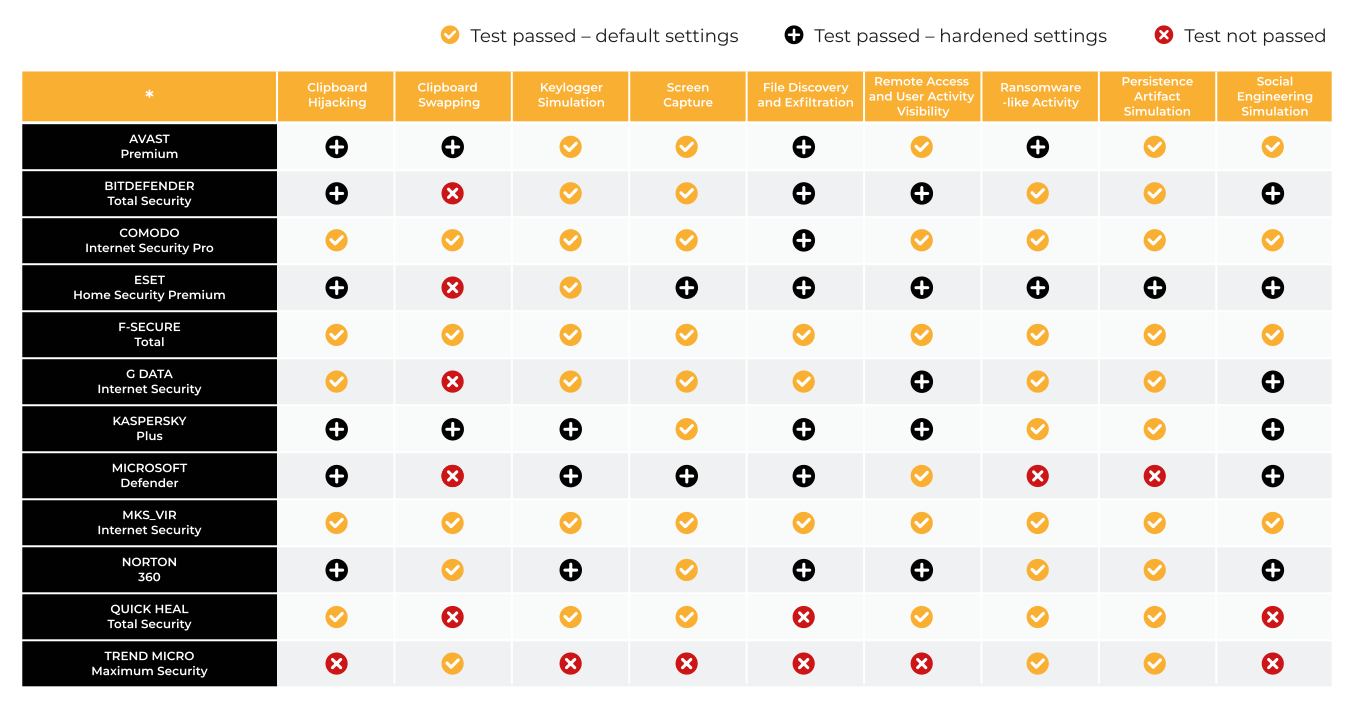
The tables with the results present an unambiguous assessment of the effectiveness of the attack scenario, regardless of the classification of the sample itself. The designation “attack successful (X)” indicates that the simulated attack achieved its technical goal, such as data interception, banking session manipulation, remote access, or persistence in the system, even if the sample used was not classified as malicious in the default configuration of the product.
In turn, the designation “attack blocked (V)” indicates that the protective mechanisms effectively prevented the attack from being carried out, regardless of whether the block occurred at the prevention, behavioral detection, memory protection, or environment isolation stage.
Test results reflect attack outcome, not malware classification. Security suites were initially tested in their default configuration. If specific protections were disabled by default, they were enabled to evaluate the feature. When detection did not occur under default settings, alternative configurations were tried.
Certificate
The “Internet Banking Protection Test – 2026” certificate is awarded once the conditions are met.
Obtaining the certificate means that the security suite effectively protects against the takeover of online banking sessions and meets the high requirements set by AVLab in terms of financial transaction protection.
AVAST Premium + Bank Mode
COMODO Internet Security Pro + Secure Shopping
F-SECURE Total + Banking Protection
KASPERSKY Plus + Safe Money
MKS_VIR Internet Security + Safe Browser
NORTON 360
Test conclusions
1.
There are situations in which, despite the correct delivery of a sample to the system with the ZoneID=3 attribute, protection mechanisms are not always able to detect 0-day files without a digital signature. This applies in particular to samples with low popularity in the manufacturer’s telemetry, including files prepared specifically for testing purposes. In such cases, it is not the classification of the file that is crucial, but the actual impact on the user, i.e., whether the simulated attack allows data interception, session manipulation, or unauthorized access.
Not every technique used in testing needs to be classified as classic malware in terms of signatures. In many scenarios, legitimate system tools, operating system functions, or mechanisms commonly available in the user environment are used. Therefore, the main evaluation criteria are the actual impact on the user (User Impact) and whether the attack achieves its technical goal, e.g., theft of credentials, manipulation of a banking session, remote access, or data exfiltration. The product’s lack of response to a “harmless” component is considered an effective attack.
3.
With default settings, security solutions often do not effectively filter network traffic generated by 0-day files with low or zero reputation (e.g., EXE files). In practice, this means that outgoing communication is not blocked if the sample has not been previously observed in the manufacturer’s cloud or has only appeared in a marginal number of cases. This is a typical and desirable situation from the point of view of test realism.
4.
We draw users’ attention to the need to use more restrictive firewall modes or HIPS modules. Automatic settings are designed to minimize the number of alerts and interference with the user’s work, which often comes at the expense of security. As a result, it becomes possible to intercept the clipboard, take screenshots, log keystrokes, and exfiltrate data to the attacker’s server. In tests, firewalls in their default configuration failed repeatedly, regardless of the manufacturer.
5.
Tests confirm that dedicated banking modes in many cases effectively limit the operation of malware running in the background. Malicious code is often unable to function properly in an isolated environment. For example, anti-keylogger mechanisms encrypt the characters entered, and attempts to gain persistence in the system are detected by specialized modules that monitor autostart mechanisms.
6.
The most advanced banking modes in the default configuration were observed in F-Secure, mks_vir, and Comodo solutions. These products use a multi-layered preventive approach, including an isolated environment for critical operations. F-Secure automatically blocks all network traffic outside the banking browser, while mks_vir reveals background processes and requires a conscious decision by the user. These mechanisms effectively reduce the attack surface.
7.
In solutions without a dedicated banking mode, packet protection can be limited if the manufacturer has not implemented additional preventive mechanisms. Tests clearly show that banking mode outperforms standard protection mode, in which similar restrictions on applications with unknown reputations are not applied.
After completing the tests, we informed the manufacturers indicated in the report about the results obtained and provided recommendations for strengthening protection. We also recommended the development of additional detection mechanisms for the techniques and tools used in this edition of the study.
Analysis of modules for protection of online banking and payments
Test of a banking mode in modern antivirus solutions