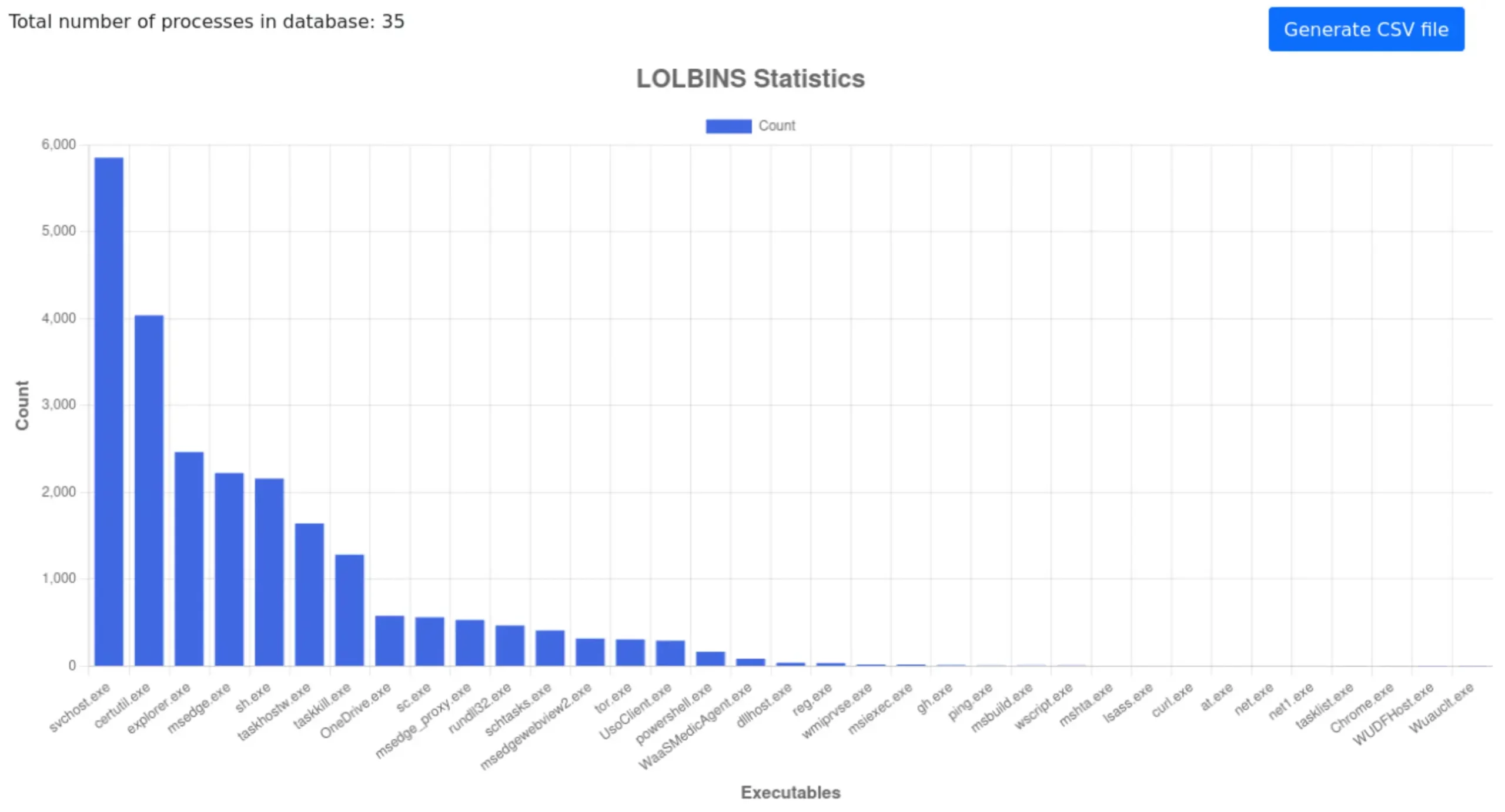
The beginning of 2026 was not peaceful at all, considering the number and effectiveness of cyberattacks. We continue to see an escalation of attacks using malware, which now increasingly rely on legitimate system components, complex TTP chains, and detection avoidance mechanisms rather than droppers. The consequence of such an attack may be its detection by a security solution only at the stage of launch, analysis in RAM, or during scanning of communication with the Command and Control server (the Runtime Defense stage, also known as Post-Execution). We note that some samples are limited to HTTPS traffic and legitimate clouds, which delays payload detection by using multiple LOLBins (legitimate Windows tools) in the workstation infection chain.
The beginning of 2026 was not peaceful at all, considering the number and effectiveness of cyberattacks. We continue to see an escalation of attacks using malware, which now increasingly rely on legitimate system components, complex TTP chains, and detection avoidance mechanisms rather than droppers. The consequence of such an attack may be its detection by a security solution only at the stage of launch, analysis in RAM, or during scanning of communication with the Command and Control server (the Runtime Defense stage, also known as Post-Execution). We note that some samples are limited to HTTPS traffic and legitimate clouds, which delays payload detection by using multiple LOLBins (legitimate Windows tools) in the workstation infection chain.
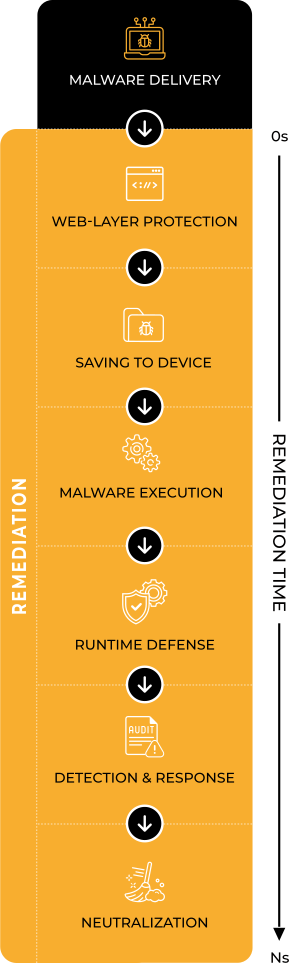
One of the main objectives of this study is to determine whether the tested solution was able to block the threat and, if so, at what stage of the incident chain this occurred.
We automatically analyze whether the decision was made at the web layer level during file download (Web-Layer Protection) or only when the malware was running in the system, when subsequent TTP techniques were launched (Runtime Defense) according to MITRE schemes.
It is equally important to determine what exactly happened in the system before the defensive response: what processes were launched, whether the registry or files were modified, whether there were attempts to communicate with the C&C infrastructure, and whether elevated privileges were required for the malware sample.
A complementary but also important element of the investigation is the remediation stage, i.e., repair. As part of this stage, we measure the so-called Remediation Time parameter, i.e., the time needed to completely remove the threat and reverse the changes in the system from the moment the threat entered the system. This parameter shows not only the ability to detect, but also the actual effectiveness of restoring the system to its pre-incident state.

Advanced In-The-Wild Malware Test
Changes to the test from January 2026
We have also improved the pre-selection stage of in-the-wild samples with additional code that more effectively identifies PUA-PUP (potentially unwanted applications that are not full-fledged malware) and eliminates them from the test database so that only actual malware is included in the study.
In addition, we have improved the mechanism for automatically downloading malware using the Opera browser in Windows, which speeds up the correlation of the test environment with the browser via the hypervisor API and reduces the time needed to prepare attack scenarios.
Furthermore, starting in March 2026, we are expanding the scope of information provided to manufacturers. For each malware sample, we will verify what permissions it requires to function effectively in Windows 11, allowing for a better assessment of the actual level of risk and the moment of escalation during an attack.
At the same time, we are developing the technical infrastructure for testing. We are improving the management of machines in the Linux environment on the host, introducing a clear separation of machine states, and increasing control over infrastructure elements that are not fully developed on the VMware side.
Results from January 2026 (round 1/6, 2026)
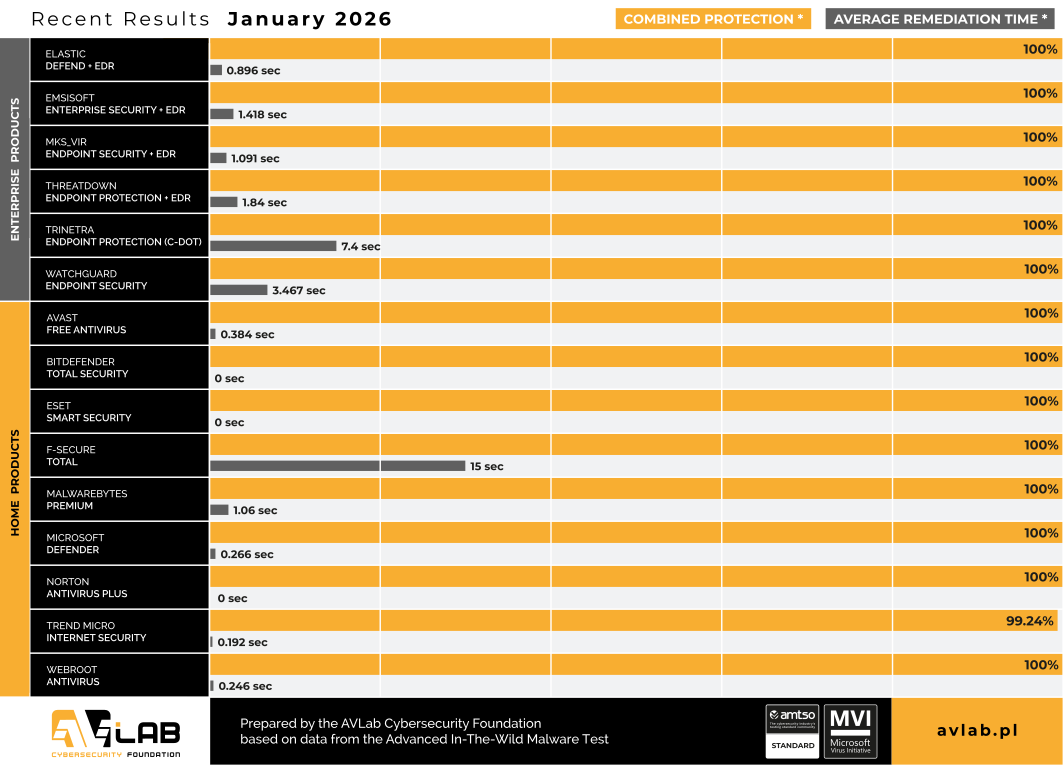
In the January 2026 edition, we usually tested using standard configurations, unless otherwise specified in the configuration description below – and this is often the case, especially in business solutions.
One of the new additions we have included is the Elastic Defend with EDR (Endpoint Detection and Response) solution with a fairly standard configuration, but with additional alerts that we can capture and process as evidence of something malicious in the system. The product uses machine learning and behavioral analysis to detect and stop threats (malware, ransomware). It is integrated with Elastic Stack, which enables centralized monitoring of security events.
The second change is the testing of the Trinetra Endpoint Protection solution, an endpoint protection platform developed by the Centre for Development of Telematics (C-DOT), an autonomous R&D center for telecommunications of the Indian government. The solution is designed for corporate environments, public administration, and strategic sectors. The system uses AI-powered analytics and multi-layered protection to monitor endpoints, detect vulnerabilities, identify anomalies, and support remediation efforts. It provides a central console and visibility into attacks, protection against ransomware, malware, fileless attacks, zero-day attacks, and insider threats.
In addition, as usual, each solution had access to the Internet, meaning that the mechanisms for analyzing and controlling downloaded files are always active. This approach allows us to evaluate the real-world behavior of the solutions in an everyday system scenario.
It can be said that we are seeing clear differences in the protection strategies of the individual solutions participating in the test. Some products made a decision at the file download stage, while others allowed it to run and only reacted after specific symptoms of malicious activity occurred, such as communication with C&C servers (used by cybercriminals to control infected devices), registry modifications, or operations on temporary files.
In the Advanced In-The-Wild Malware Test, we focus on threats delivered directly from the Internet. Here, we would like to point out to readers that the results may not always be identical to the effectiveness of protection against other infection vectors, such as email, portable media, or network resources.
In any case, each instance of failure to block is documented (logs, screenshots) and provided to the manufacturer upon request in the form of a detailed technical report.
Configuration of the solutions we tested
Environment Configuration
What settings do we use?
During testing, we always run all available protection modules, including:
- real-time scanning,
- reputation mechanisms and cloud analytics,
- network traffic control,
- behavioral analysis,
- EDR-XDR modules,
- if possible, a dedicated security extension for your browser, which plays a key role in blocking threats from the Internet.
Policy toward PUP&PUA
Although we do not use PUP&PUA samples (i.e., potentially unwanted but not necessarily malicious applications) in our tests, we recommend enabling protection against this type of software as well. This feature allows you to block applications that interfere with the operation of your system or browser, even if they are not considered classic malware. We always activate the PUP/PUA protection option in all tested products.
Incident response and activity logging
We configure each product so that, if its capabilities allow, it automatically responds to threats: blocking suspicious activity, removing malicious files, or restoring modified system components. All these operations are recorded in detail and analyzed by our dedicated software, which allows us to correlate events such as file blocking, process isolation, or registry entry cleaning.
Transparency and product configuration
The default settings of most solutions are robust, but they do not always provide the maximum level of protection. That is why we report every change in product configuration, both those that increase the level of security and those that result directly from the developers’ recommendations. It is worth noting that some tools do not offer additional options, so it is not always necessary or possible to modify the settings.
Enterprise Solutions

Elastic Defend + EDR
All Shields on Prevent mode + Attack surface reduction Enabled + collect all Events from workstation
Emsisoft Enterprise Security + EDR
Default settings + automatic PUP repair + EDR + Rollback + browser protection

mks_vir Endpoint Security + EDR
Extended http/https scanning enabled + browser protection + EDR

ThreatDown Endpoint Protection + EDR
Default settings + browser protection + EDR

Trinetra Endpoint Protection
Default settings + browser protection
WatchGuard Endpoint Security
Default settings + browser protection
Solutions for Consumers and Small Business

Avast Free Antivirus
Default settings + automatic PUP repair + browser protection

Bitdefender Total Security
Default settings + browser protection

Eset Smart Security
Default settings + browser protection

F-Secure Total
Default settings + browser protection

Malwarebytes Premium
Default settings + browser protection

Microsoft Defender
Default settings + “Block at First Sight” + “MAPS” enabled

Norton Antivirus Plus
Default settings + browser protection

Trend Micro Internet Security
Default settings + browser protection

Webroot Antivirus
Default settings + browser protection
In the January edition, we observed a slight improvement in effectiveness at the pre-launch stage for all manufacturers. This was largely due to the presence of evolutionary threats based on known malware families, which are easier to identify at the web layer, but are still new threats in our database because we never test on two identical samples (see methodology in the section on selecting malware samples for testing).

Real Threat Detection & Response
Methodology, purpose, and scope of the study
Six editions of the test are conducted throughout the year, and their results are compiled into an annual summary of the effectiveness of security solutions. Each edition covers products intended for both home users and corporate environments, and the evaluation is based on a full course of a real attack.
The analysis focuses on three complementary phases:
Web-Layer Protection (Pre-Execution) – we check whether the solution can block the threat before it is launched, e.g., at the web layer level, during file download, or at the first attempt to access the malicious resource.
Runtime Defense (Post-Execution) – we evaluate the product’s response when the code has already been executed in the system. This stage reflects 0-day scenarios and fileless attacks in memory, where runtime protection plays a key role.
Remediation Time – we measure the time and effectiveness of the full response to an incident, including neutralizing the threat and rolling back changes to the system. This parameter shows how effectively the solution can restore the system to its pre-infection state.
The entire test allows us to assess how products respond to current attack techniques – both in mass and more targeted scenarios. At the same time, the collected telemetry provides data for analyzing the current threat landscape, including new infection vectors, ways to bypass security measures, and changes in the TTPs used by cybercriminals.
About AVLab Cybersecurity Foundation
Advanced In-The-Wild Malware Test