We have completed our summary of the March 2026 edition of the Advanced In-The-Wild Malware Test. One of the main objectives of this study is to determine whether the tested solution was able to block the threat, and if so, at what stage of the entire incident chain this occurred. We automatically analyze whether the decision was made at the web layer—before the download began, during the file download (Web-Layer Protection, i.e., before execution), or only during execution or while the malware was active on the system (Runtime Defense), when subsequent TTP techniques are executed according to MITRE frameworks.
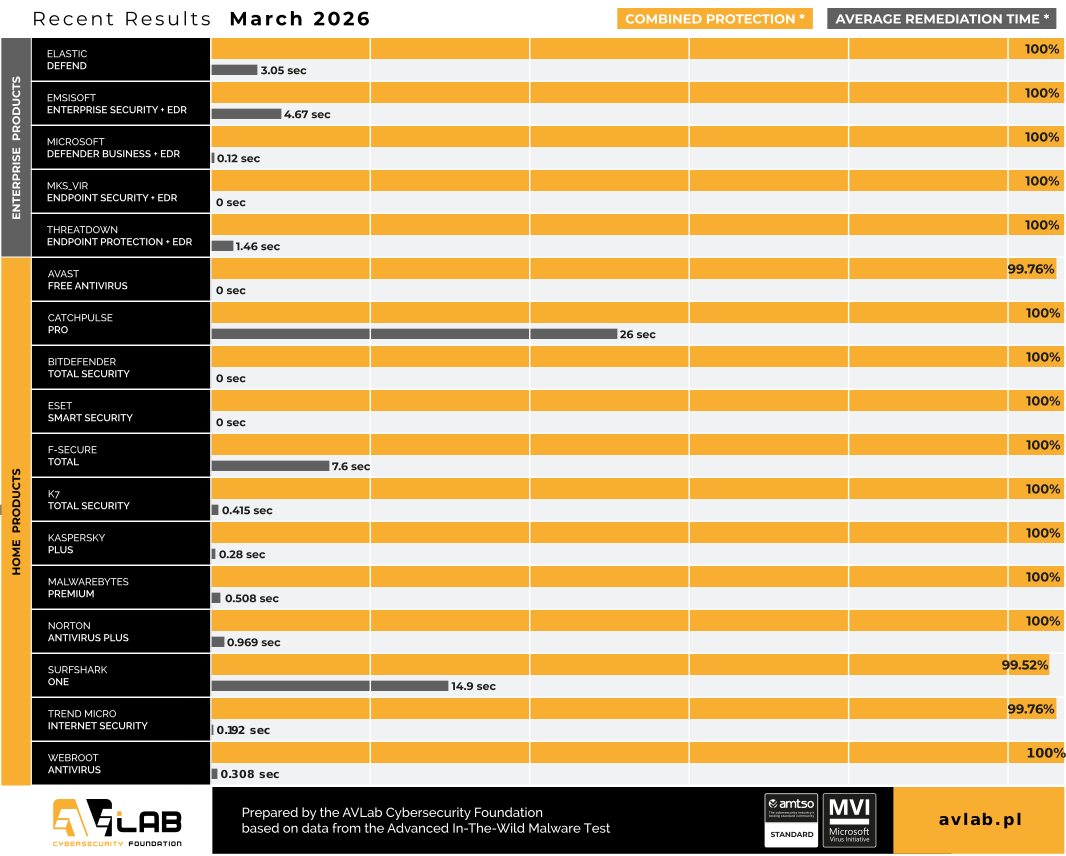
A complementary yet equally important element of the analysis is the remediation phase. As part of this, we measure the so-called Remediation Time parameter, which is the time required to fully remove the threat and revert changes in the system from the moment the threat entered the system. This parameter demonstrates not only the ability to detect threats but also the actual effectiveness of restoring the system to its pre-incident state.
Known malware samples and techniques that exploit well-recognized patterns (e.g., those associated with specific MITRE ATT&CK IDs) remain relatively easy to detect and block using modern security solutions. In such cases, detection mechanisms behave predictably, and the telemetry is comprehensive, enabling a quick understanding of the incident and its reconstruction. At the same time, observed campaigns are increasingly deviating from these patterns. Attacks leverage system components, “living-off-the-land” techniques, and multi-stage chains of actions that do not always clearly fit known patterns. As a result, the point of detection shifts to later phases of the attacks related to process activity, behavioral analysis, or network communication.
Encrypted HTTPS traffic and legitimate cloud services are also being used more frequently, which limits the effectiveness of detection methods based solely on reputation or URL analysis. In such scenarios, the quality of telemetry and the ability to correlate events over time are of critical importance.
Our methodology is based on the analysis of full event chains, which allows us to assess not only the effectiveness of blocking but also the level of visibility and the ability to reconstruct the incident.
It is equally important to determine exactly what happened in the system before the defensive response:
- What processes were launched?
- Were the registry or files modified?
- Were there attempts to communicate with the C&C infrastructure?
- Did the malware sample require elevated privileges?
Our tests comply with the guidelines of the Anti-Malware Testing Standards Organization. Details about the test are available at this website as well as in our methodology.
Advanced In-The-Wild Malware Test
Changes to the test starting in March 2026
Starting with this release, we have improved the management of Windows 11 machines in a Linux host environment by clearly separating the BOOT and JOB states. This provides greater control over areas where VMware’s implementation is incomplete, which has resulted in fewer errors caused by the VMware API and greater stability in the machine management process.
March Results (Round 2 of 6, 2026)
CatchPulse Pro
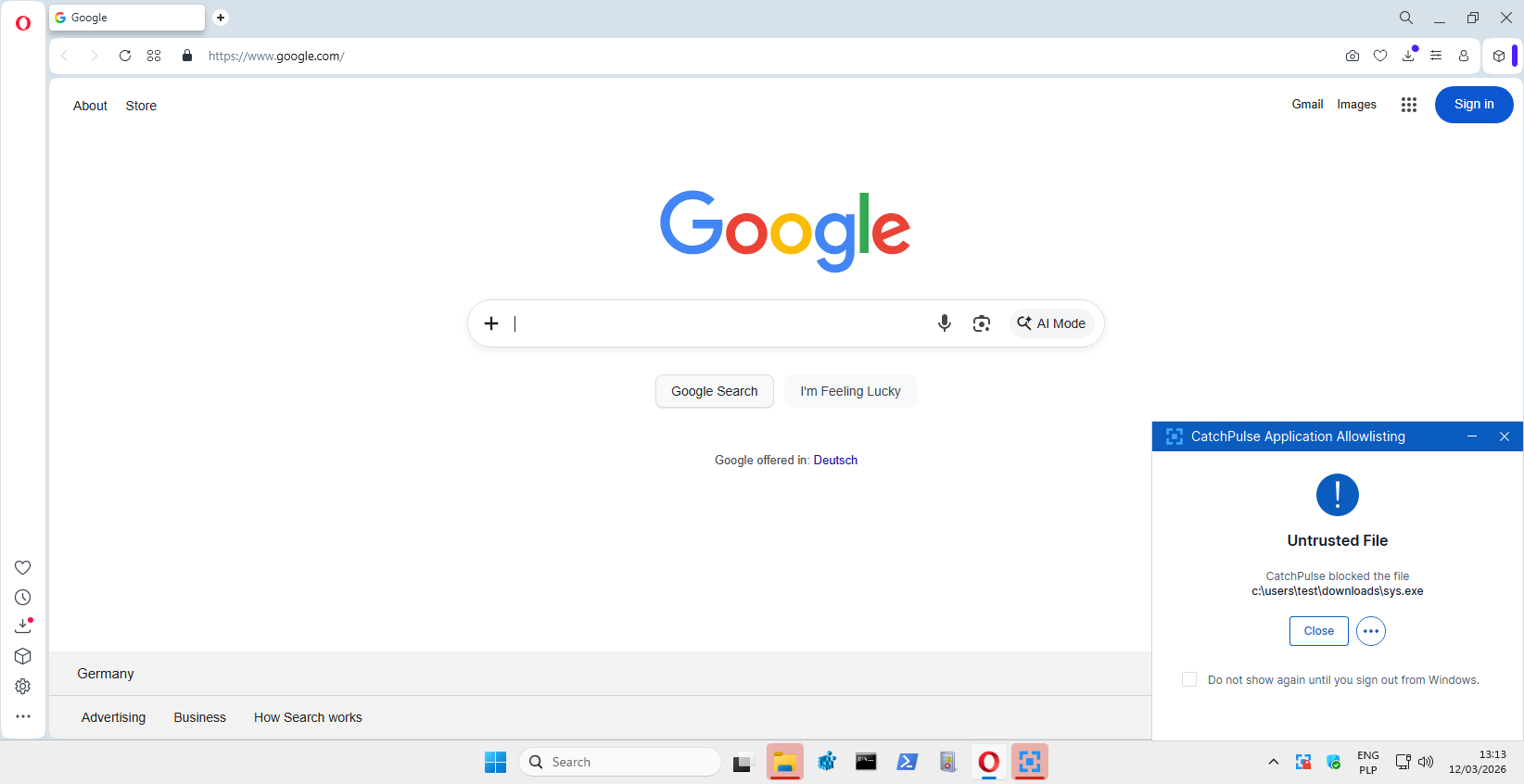
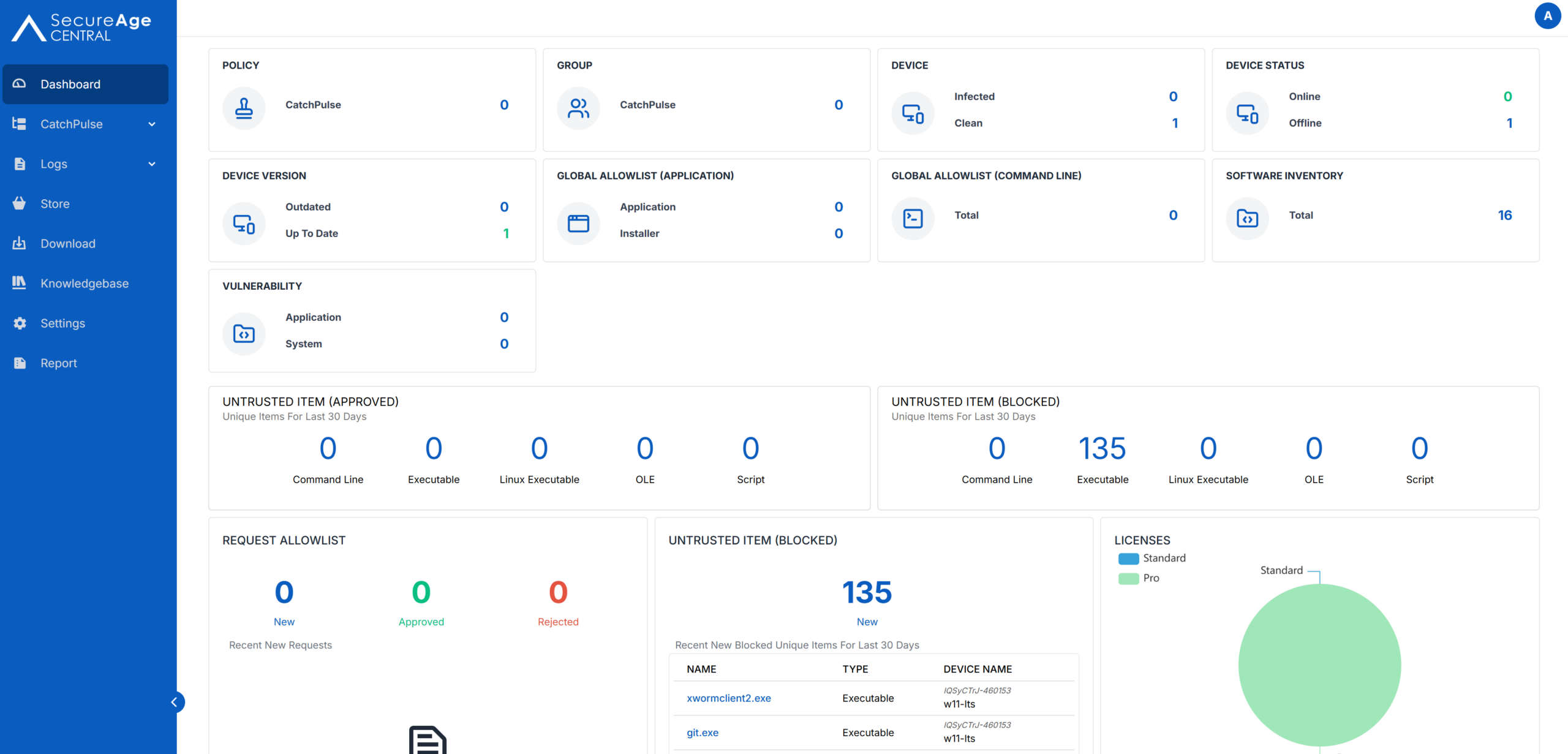
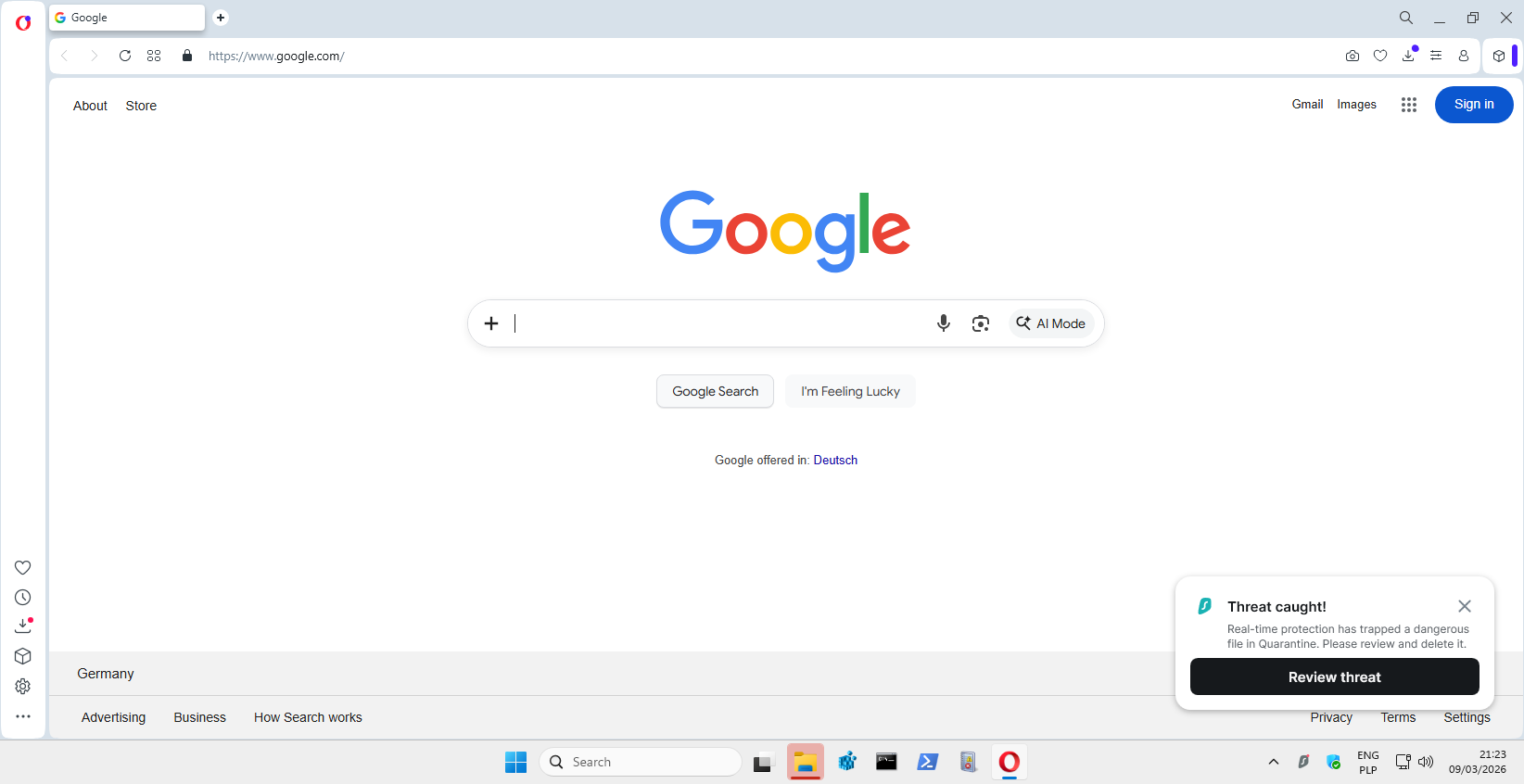
Among the new features we’ve added is the CatchPulse Pro solution, which was included in the tests in a configuration similar to the standard one. Similar, because we used Block Mode, which was not active by default. This mode enables active blocking of unauthorized file operations and enforcement of security policies at the operating system level, which allowed us to evaluate the solution’s effectiveness not only in terms of telemetry and detection, but also in terms of actual threat prevention.
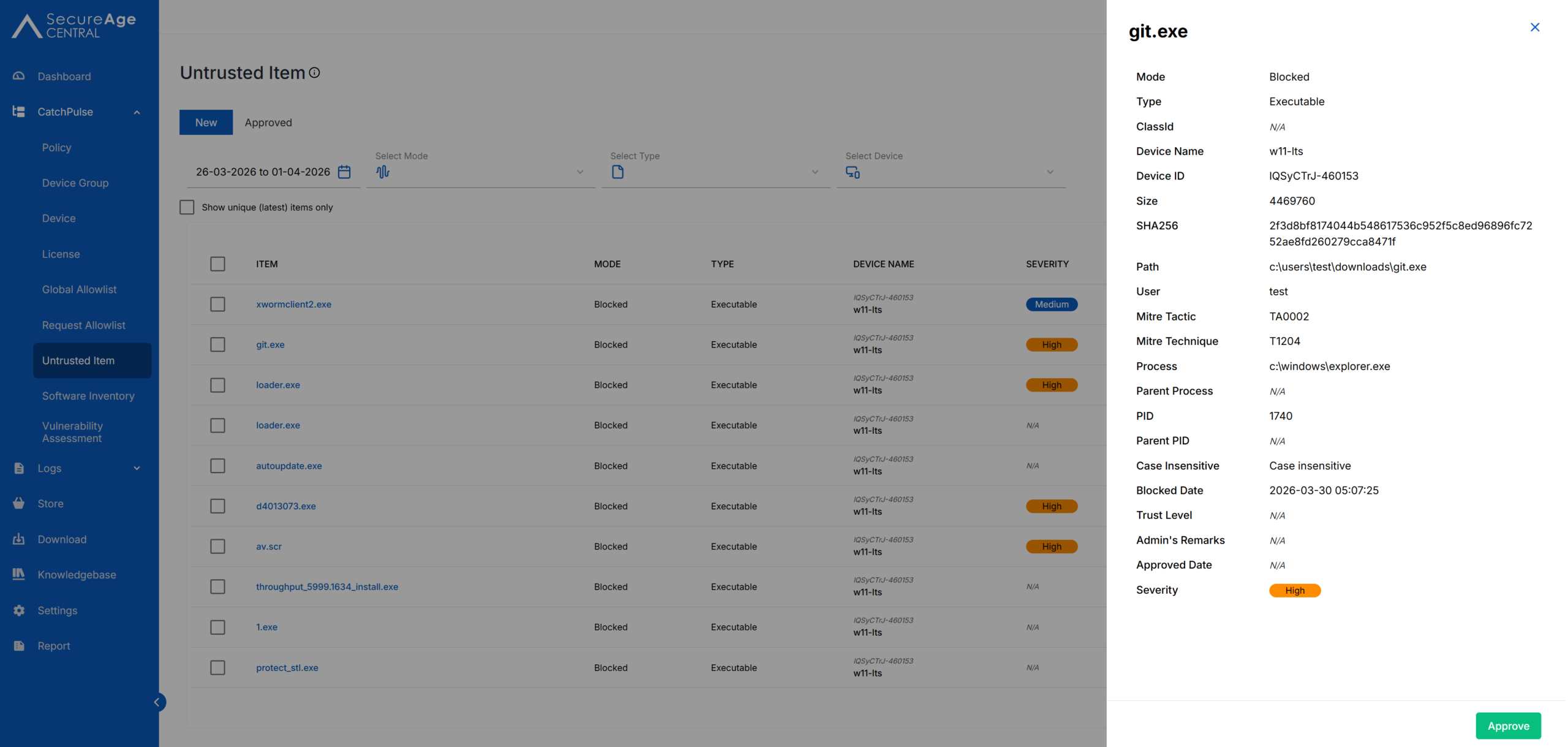
For example, CatchPulse Pro successfully blocked and reported to the console an attempt to run the suspicious file “git.exe,” which was downloaded to the “Downloads” directory and executed by the user ‘test’ on the host “w11-lts.” The file with SHA256 hash 2f3d8bf81… was stopped at the “Execution” stage before any further activity occurred on the system.
The process was launched from explorer.exe, indicating direct user interaction. Our tests are deliberately designed to replicate actual user actions performed from the system’s graphical shell, including opening files by double-clicking with the mouse, rather than from the command line.
Overall, the event was classified according to MITRE ATT&CK as:
- T1204 User Execution.
- The block occurred immediately after the launch attempt.
- The threat was marked as high severity.
- Basic telemetry (file, hash, user, host) was retained.
Surfshark One
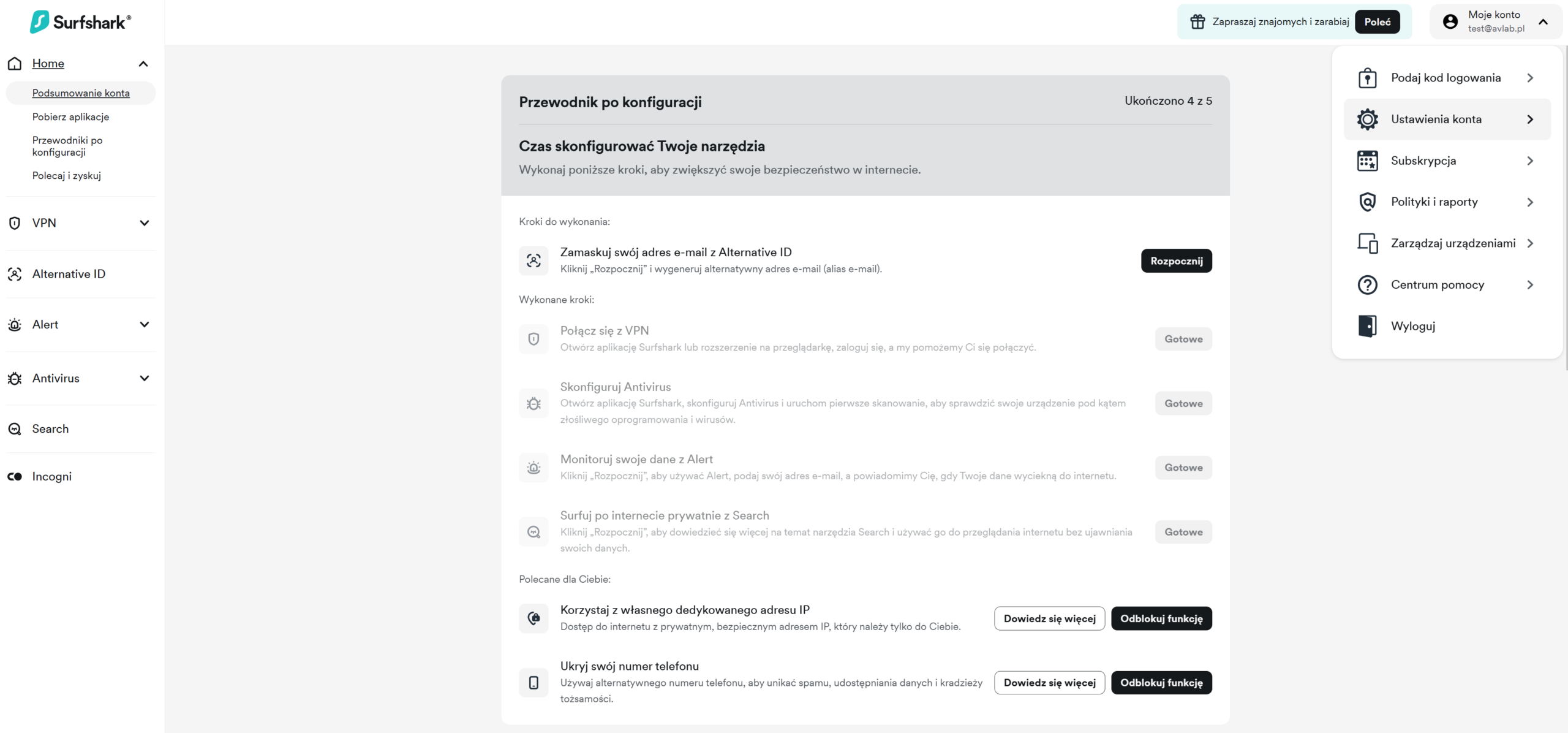
We also tested the Surfshark One solution with an antivirus module, which was included in this study to evaluate its performance in scenarios involving real-world threats from the internet. These types of products, which combine a VPN, identity protection, and antivirus features, are becoming increasingly popular as “all-in-one” solutions, particularly among individual users who expect simplicity and a wide range of protection in a single tool.
Prior to testing, verification of all security mechanisms—both at default settings and with security features enabled—began with an initial software configuration on Windows 11 Pro. Additionally, the solution was integrated with our test backend, including log collection tools and a screenshot tool, which provide evidence shared with manufacturers.
Active access to the Dashboard does not allow for receiving antivirus alerts from various devices connected to the console under a single account, but it is possible to verify modules that are intended to operate in real time.
The test results reflect real-world end-user conditions, without limitations resulting from incomplete configuration or test mode.
Elastic Defend
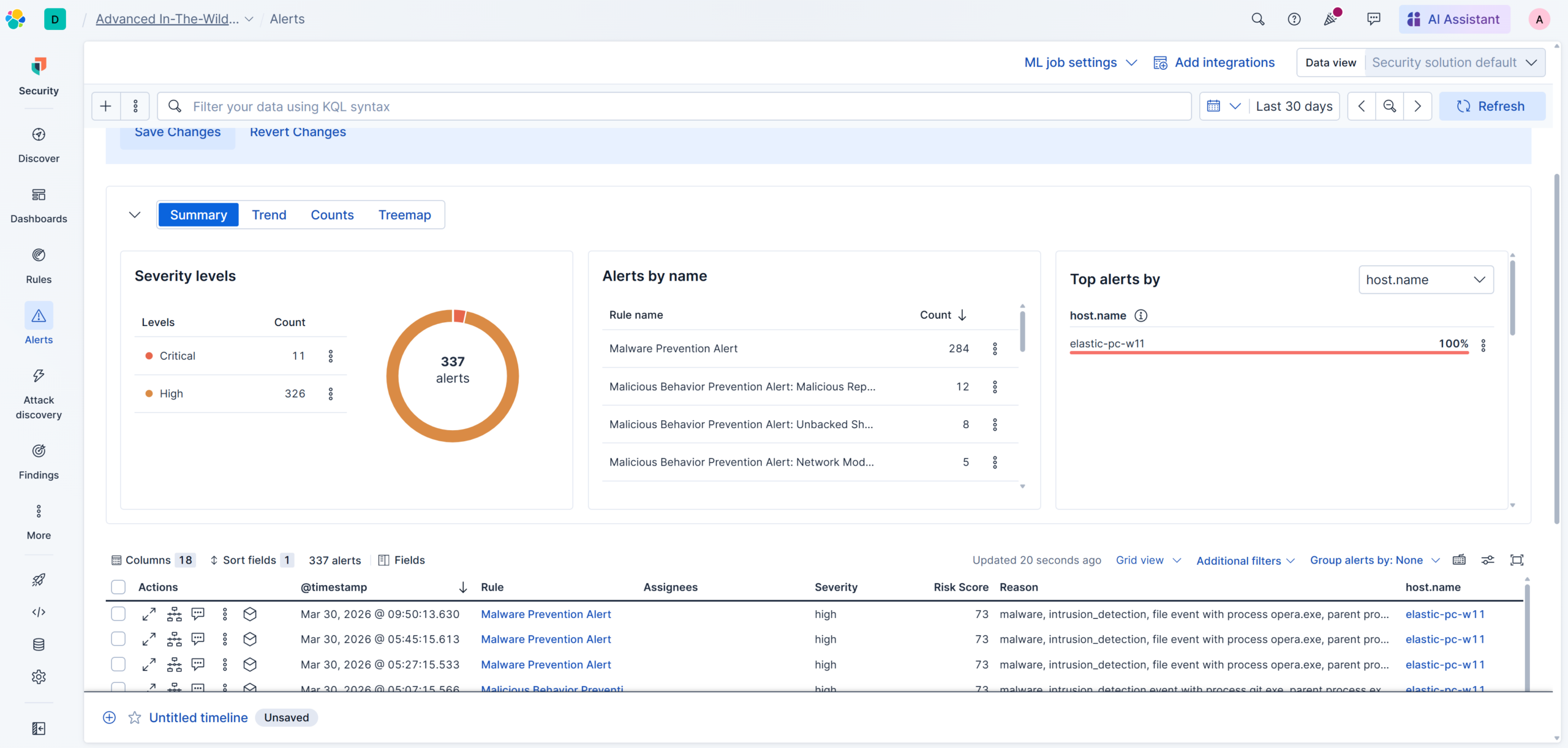
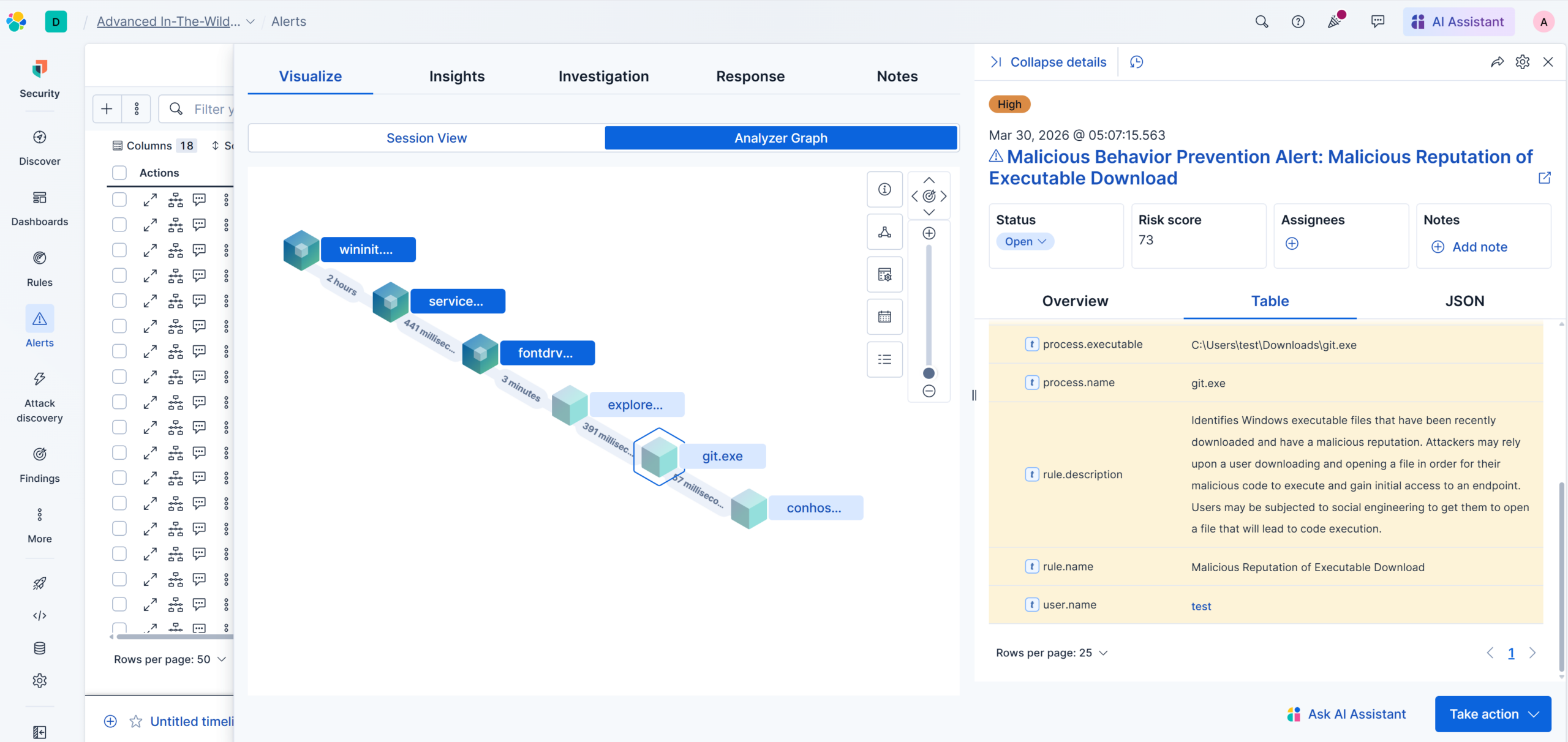
Below is an example of the advanced telemetry capabilities of the Elastic Defend solution, configured by default in “Prevent” mode, which detected and flagged as high-severity an attempt to execute a malicious file on a Windows system. The alert concerned the file “git.exe,” downloaded to the “Downloads” directory and executed by the user “test” on the host “elastic-pc-w11.” The file lacked a digital signature and had a known malicious reputation, resulting in an alert with a risk score of 73. Additionally, the event was correctly classified within the MITRE ATT&CK framework as:
- T1204 User Execution
- T1204.002 Malicious File
The key point is that the file was launched directly from “explorer.exe” (i.e., user interaction), but the lack of a digital signature increased the risk, and detection occurred at the Runtime Defense stage (post-execution).
From the Security Operations Center’s perspective, the alert was generated correctly; the telemetry allows for unambiguous identification of the entry point (Downloads folder + user execution), and it is also possible to reconstruct the attack chain (parent-child, hash, user, host).
Microsoft Defender Business
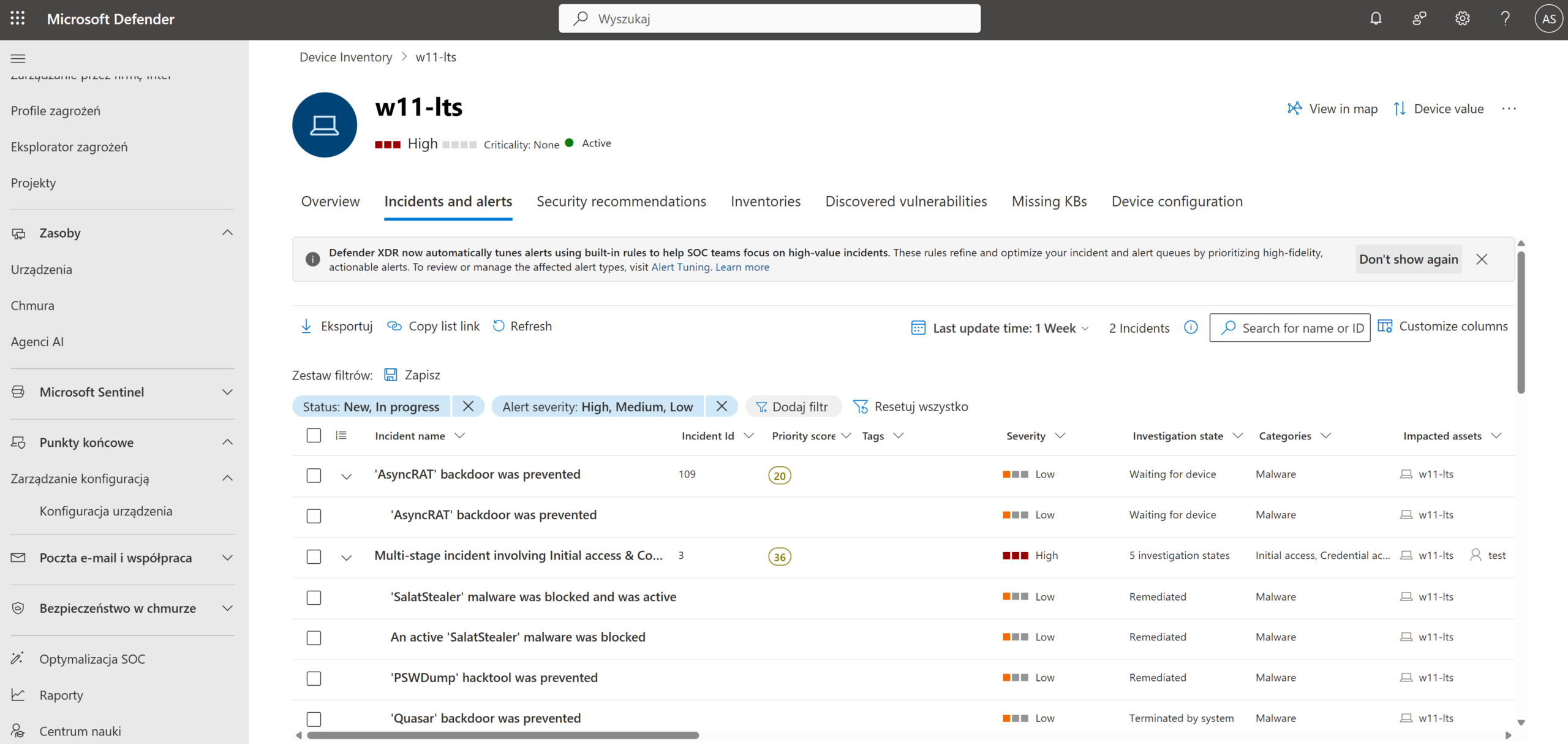
Another new solution is Microsoft Defender for Business, which comes configured by default with “Block at First Sight” settings enabled and EDR in block mode. The test evaluated both the effectiveness of prevention and the quality of telemetry available in a business environment, which enabled the correlation of potentially malicious actions and the ability to remediate incidents.
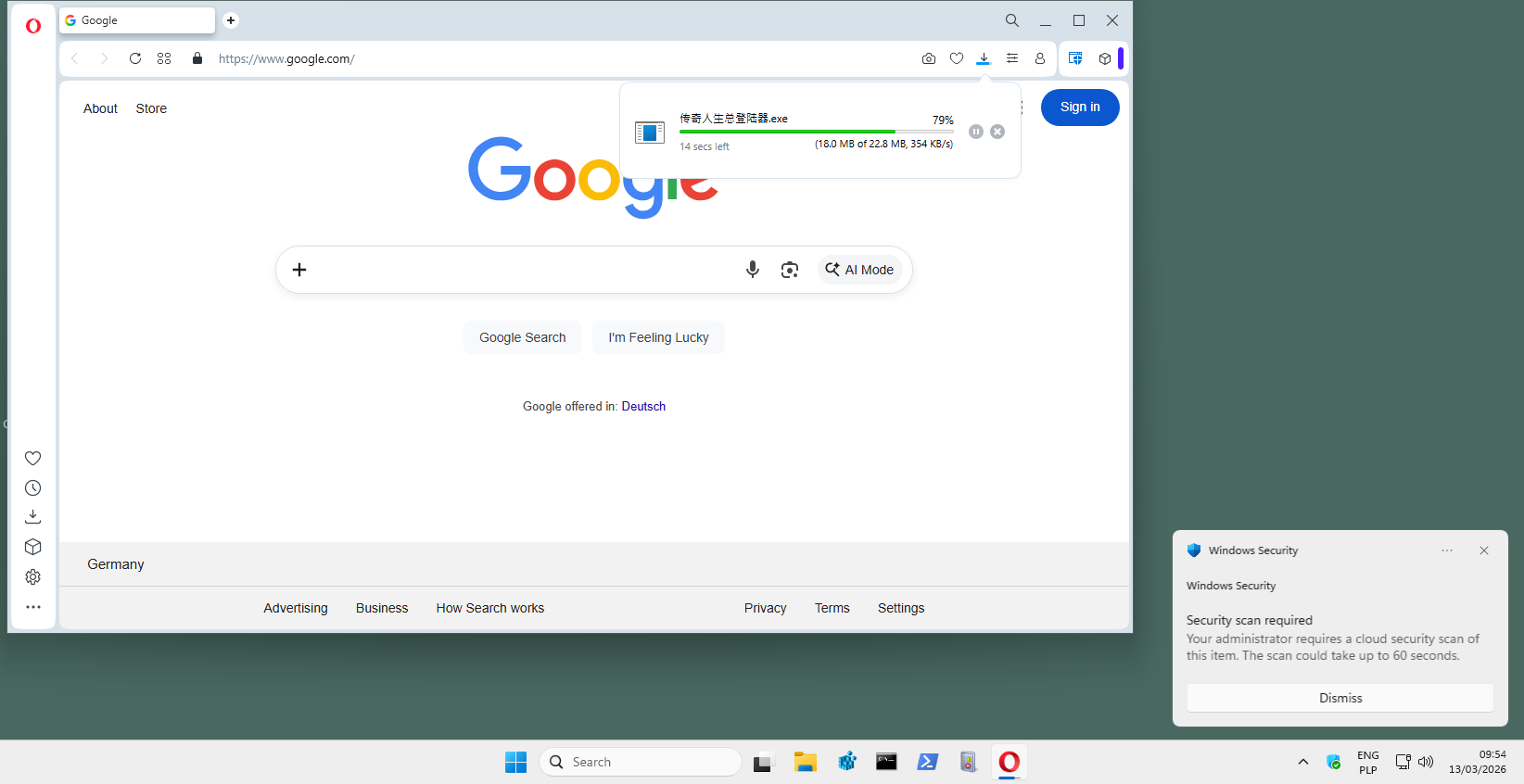
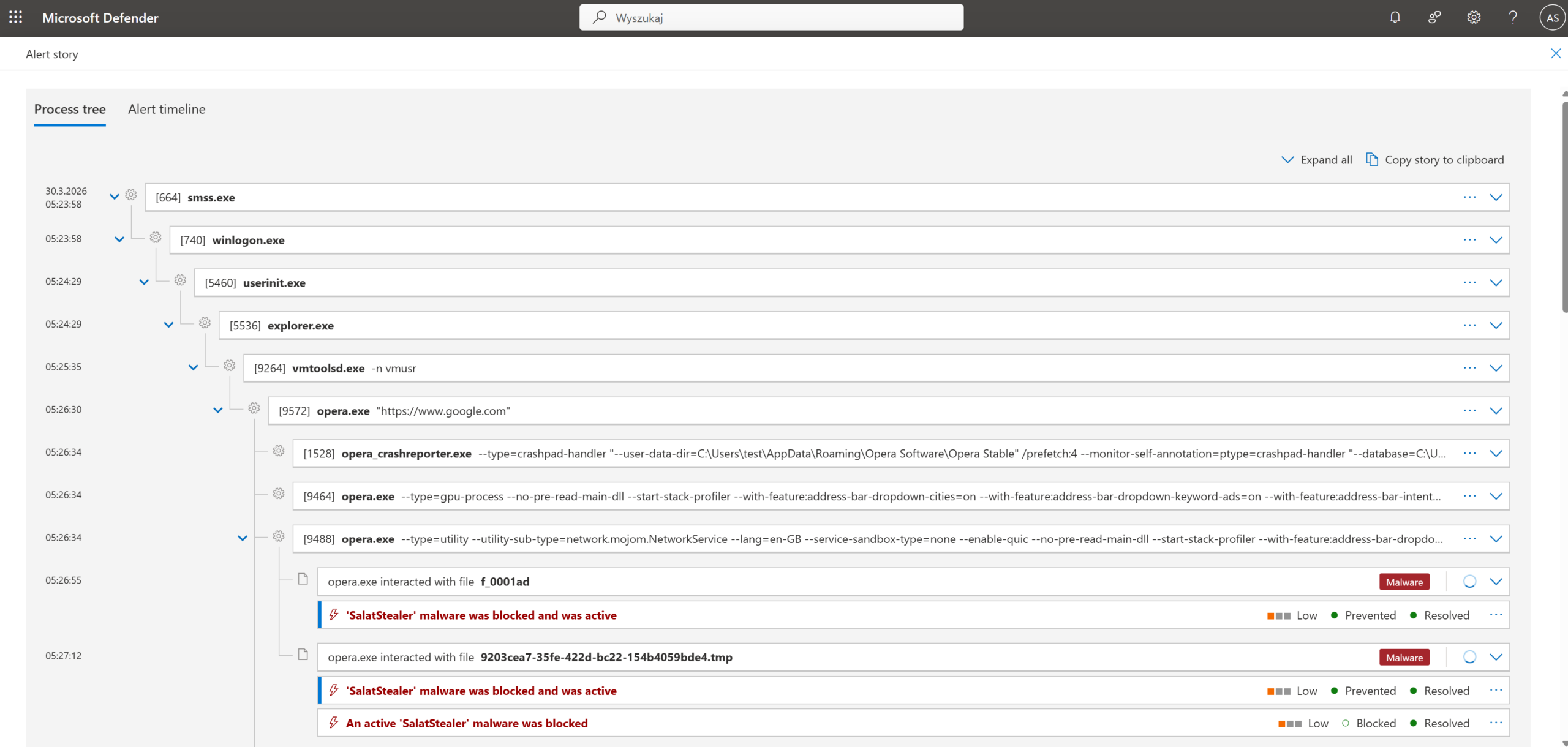
For example, Microsoft Defender Business successfully blocked an attempt to deliver and execute a stealer-type malware (Trojan:Win32/SalatStealer) as early as the download stage via the Opera browser.
The attack began with the download of a file from the URL (hxxp://xx.xx.xxx.xxx/rat/GLOBAL.exe), which was correctly flagged as:
- 002 Spearphishing Link
- 001 Malicious Link
The file was saved in the “Downloads” folder and then processed in the browser cache. Defender detected the malicious code (packed runtime) based on reputation and signatures, identifying all related artifacts (.tmp file, cache, final GLOBAL.exe) using the same SHA1 hash.
The key point in this incident is that detection occurred before the payload was successfully executed, the malware was automatically quarantined, and protection covered all copies of the file (Downloads + cache). In the telemetry, we see the full delivery context: browser → URL → file, with the continuity of artifacts preserved.
From the Blue Team’s perspective, effective blocking occurred at the initial access/delivery stage,
Additionally, we have very good visibility into the source of the infection (URL + Mark-of-the-Web designation) and the ability to fully reconstruct the incident. Thus, this is an example of how Microsoft Defender effectively stops stealer-type threats even before they execute, combining reputation-based detection with download context analysis.
In summary of the March edition
Each of the tested solutions had Internet access, ensuring that all mechanisms related to the analysis and control of downloaded files remained active. This allows us to replicate real-world operating conditions and evaluate the products’ behavior in a typical user scenario.
Additionally, it is worth noting that in this edition, the quality of telemetry and event correlation capabilities were of greater importance. In situations where detection did not occur at the Web Layer, it became crucial whether the solution provided sufficient visibility into the process, user context, and relationships between events, enabling rapid incident reconstruction.
Another key element of the methodology is that all scenarios involve actual user actions (e.g., opening files from a graphical interface rather than a terminal), which allows us to assess the effectiveness of protection under conditions as close as possible to real-world attacks, rather than in a model of artificially executing samples.
Additionally, this month we observed a decline in detection effectiveness at the Web Layer. This is mainly due to changes in the characteristics of the samples, which increasingly relied on unique, short-lived URLs, encrypted HTTPS traffic, and the use of legitimate cloud services. This approach limits the effectiveness of reputation-based mechanisms and blacklists, which require time to propagate threat information. Some campaigns utilized multi-stage delivery chains in which the initial component was not clearly malicious or served only an intermediate role. As a result, more samples reached the execution stage, where behavioral analysis and Runtime Defense mechanisms played a key role in detecting and stopping the attack.
During testing, differences in the approach to protection are evident. Some solutions make a decision as early as the file download stage, while others allow the file to run and react only based on activity within the system, such as communication with C&C servers, registry changes, or file operations.
Every instance of a block or failure to block is documented (logs, screenshots, process trees) and, upon request, provided to the vendor in the form of a detailed technical report.

Description of the configurations of the solutions we tested
We analyzed over a dozen Windows security solutions, covering both the consumer and business segments. The tested products featured a variety of detection models, ranging from classic signature-based mechanisms to comprehensive EDR-XDR platforms that utilize behavioral analysis and cloud support.
Enterprise Solutions
Elastic Defend + EDR
All Shields on Prevent mode + Attack surface reduction Enabled + collect all Events from workstationEmsisoft Enterprise Security + EDR
Default settings + automatic PUP repair + EDR + Rollback + browser protection
Microsoft Defender for Business + EDR
Default policy + configuration settings („Block at First Sight” enabled + EDR in block mode
mks_vir Endpoint Security + EDR
Extended http/https scanning enabled + browser protection + EDR
ThreatDown Endpoint Protection + EDR
Default settings + browser protection + EDR
Solutions for Consumers and Small Business
Avast Free Antivirus
Default settings + automatic PUP repair + browser protection
CatchPulse Pro
Default settings + Block Mode
Bitdefender Total Security
Default settings + browser protection
Eset Smart Security
Default settings + browser protection
F-Secure Total
Default settings + browser protection
K7 Total Security
Default settings + browser protection
Kaspersky Plus
Default settings + browser protection
Malwarebytes Premium
Default settings + browser protection
Norton Antivirus Plus
Default settings + browser protection
Surfshark One
Default settings + browser protection
Trend Micro Internet Security
Default settings + browser protection
Webroot Antivirus
Default settings + browser protection
Environment Configuration
What settings do we use?
During testing, we always run all available protection modules, including:
- real-time scanning,
- reputation mechanisms and cloud analytics,
- network traffic control,
- behavioral analysis,
- EDR-XDR modules,
- if possible, a dedicated security extension for your browser, which plays a key role in blocking threats from the Internet.
Policy toward PUP&PUA
Although we do not use PUP&PUA samples (i.e., potentially unwanted but not necessarily malicious applications) in our tests, we recommend enabling protection against this type of software as well. This feature allows you to block applications that interfere with the operation of your system or browser, even if they are not considered classic malware. We always activate the PUP/PUA protection option in all tested products.
Incident response and activity logging
We configure each product so that, if its capabilities allow, it automatically responds to threats: blocking suspicious activity, removing malicious files, or restoring modified system components. All these operations are recorded in detail and analyzed by our dedicated software, which allows us to correlate events such as file blocking, process isolation, or registry entry cleaning.
Transparency and product configuration
The default settings of most solutions are robust, but they do not always provide the maximum level of protection. That is why we report every change in product configuration, both those that increase the level of security and those that result directly from the developers’ recommendations. It is worth noting that some tools do not offer additional options, so it is not always necessary or possible to modify the settings.
Advanced In-The-Wild Malware Test - methodology, objective, and ccope of the study
Six rounds of testing are conducted throughout the year, and the results are compiled into an annual report on the effectiveness of security solutions. Each round includes products designed for both home users and corporate environments, and the evaluation is based on the full course of a real-world attack.
The analysis focuses on three complementary phases:
Web-Layer Protection (Pre-Execution) – we check whether the solution can block a threat before it is executed, including at the web layer, during file download, or upon the first attempt to access a malicious resource.
Runtime Defense (Post-Execution) – we evaluate the product’s response once the code has already been executed on the system. This stage reflects 0-day scenarios and fileless in-memory attacks, where runtime protection plays a key role.
Remediation Time – we measure the time and effectiveness of a full incident response, including threat neutralization and reversal of changes to the system. This metric shows how effectively the solution can restore the system to its pre-infection state.
The entire test allows us to assess how products respond to current attack techniques—both in mass-scale and more targeted scenarios. Simultaneously collected telemetry provides data for analyzing the current threat landscape, covering new infection vectors, methods of bypassing security measures, and changes in the TTPs used by cybercriminals.
About AVLab Cybersecurity Foundation
The AVLab Cybersecurity Foundation is a respected organization operating within the Anti-Malware Testing Standards Organization (AMTSO) and the Microsoft Virus Initiative (MVI). It specializes in improving digital security through detailed testing and analysis of security solutions. AVLab experts use advanced and realistic methods to evaluate the effectiveness of security software under real-world threat conditions. The organization regularly updates its testing protocols, enabling it to provide reliable and valuable cybersecurity reports that help both individual users and businesses make informed decisions about protecting their systems.