Analysis of system protection against active online malware – July 2025

21 August 2025

The latest edition of the Advanced In-The-Wild Malware Test series, conducted in July 2025, introduces several changes. Firstly, developers of the tested security solutions will receive additional extended logs in the form of an event tree with correlated processes, newly created and deleted files, commands executed in the terminal, Internet connections, and other instructions executed by the malware. This will allow for faster and easier analysis of what happened at the point of contact between the malware and the tested security package. These logs can also serve as additional evidence of the lack of response of the antivirus/EDR engine to malware:

malware drops files scaled
As an example, one of the malware samples dropped files into the TEMP folder to initiate malicious activity on the system.
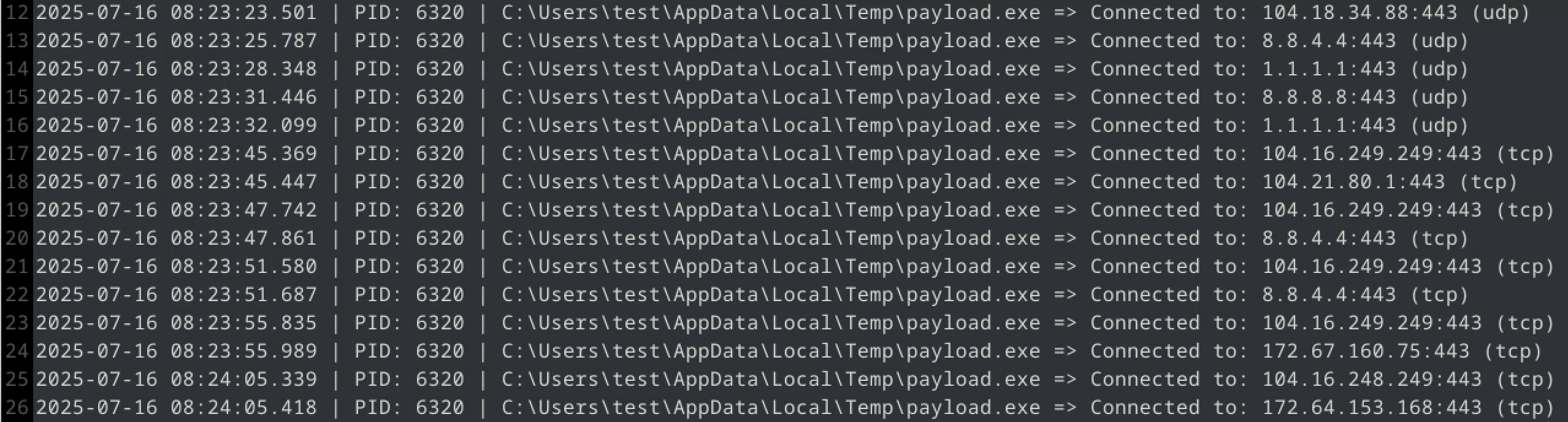
tcp udp connections established by malware sample
Here, malware queries known DNS providers and lesser-known IP servers in order to use C&C (an attempt to obtain additional instructions from a server controlled by the attacker).

In addition, at the end of June 2025, we updated our Windows 11 operating systems to the latest versions in order to use the most up-to-date Windows 11 builds during testing. Other programs are also updated on an ongoing basis during testing, as described step by step in our methodology. Finally, starting with this edition, we are capturing information from even more LOLBINs – legitimate Microsoft tools and processes that can be used by malware to hide itself or download additional malicious programs and scripts.

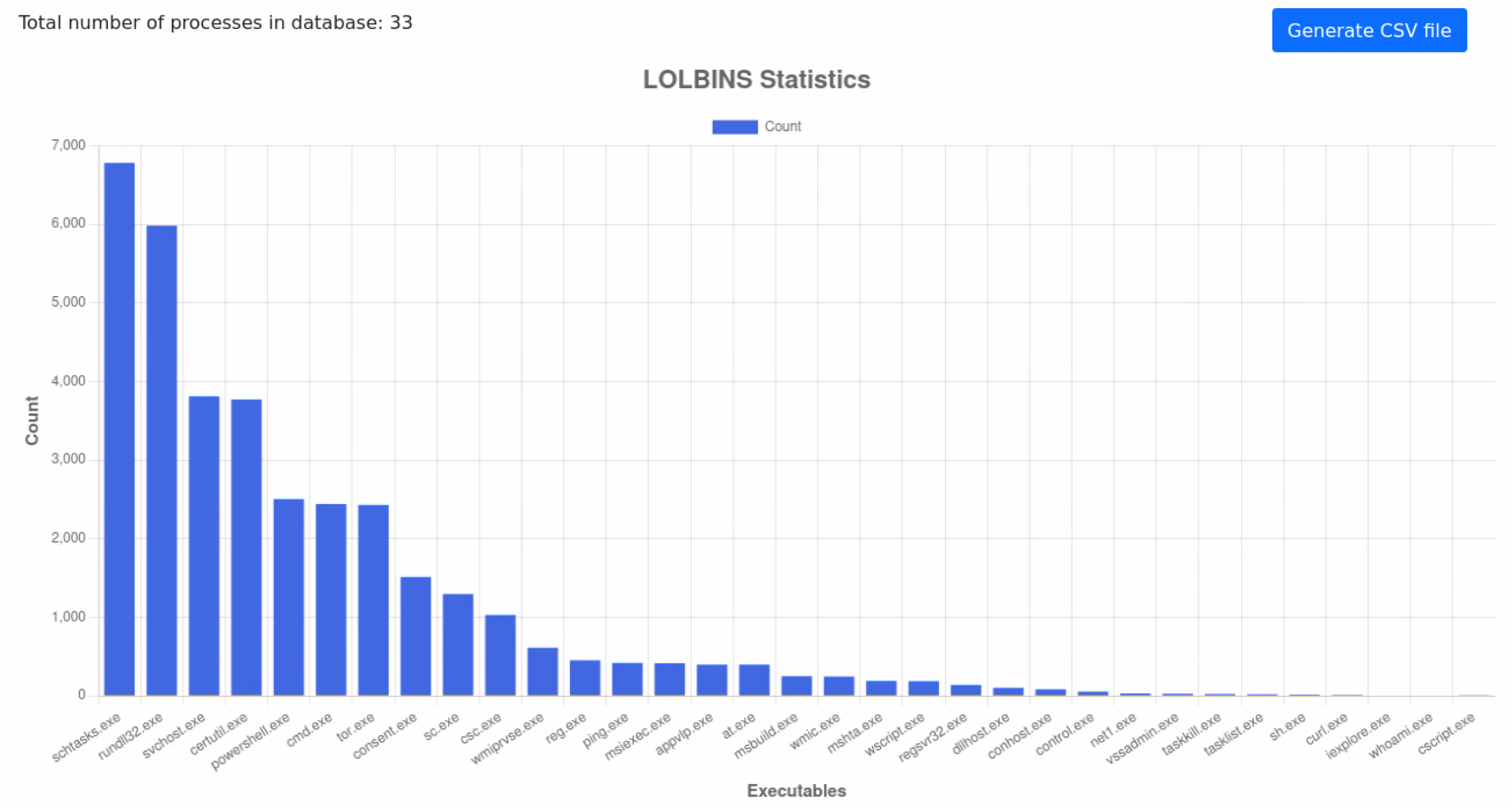
lolbins stats by avlab in July 2025 scaled
Statistics collected on the use of legitimate Windows processes during the Advanced In-The-Wild Malware Test in July 2025.

Malware often uses native Windows tools and components (so-called LOLBins – Living off the Land Binaries) to perform unauthorized operations without raising suspicion. Based on the analyzed logs, the following number of cases were identified where legitimate system processes were involved in malware activities:

  1. schtasks.exe, 6782
  2. rundll32.exe, 5984
  3. svchost.exe, 3810
  4. certutil.exe, 3772
  5. powershell.exe, 2505
  6. cmd.exe, 2440
  7. tor.exe, 2432
  8. consent.exe, 1514
  9. sc.exe, 1297
  10. csc.exe, 1032
  11. wmiprvse.exe, 613
  12. reg.exe, 455
  13. ping.exe, 421
  14. msiexec.exe, 420
  15. appvlp.exe, 399
  16. at.exe, 398
  17. msbuild.exe, 252
  18. wmic.exe, 250
  19. mshta.exe, 194
  20. wscript.exe, 189
  21. regsvr32.exe, 140
  22. dllhost.exe, 105
  23. conhost.exe, 86
  24. control.exe, 56
  25. net1.exe, 34
  26. vssadmin.exe, 30
  27. taskkill.exe, 26
  28. tasklist.exe, 23
  29. sh.exe, 20
  30. curl.exe, 14
  31. iexplore.exe, 8
  32. whoami.exe, 7
  33. cscript.exe, 4

Results in July 2025

In July, we tested 16 solutions for home and business use in terms of detecting and neutralizing online threats encountered on a daily basis on the Internet. We obtain URLs leading to malicious files from various sources. These include commercial and free feeds, instant messengers, online forums, and honeypots.

Our tests comply with the guidelines of the Anti-Malware Testing Standards Organization. Details about the test are available at this website as well as in our methodology.

What solutions did we test in July 2025?

What settings do we use?

Although we try to avoid PUP and PUA samples (potentially unwanted applications that are not 100% malware) in our tests, we recommend enabling protection against these types of threats — we always activate it ourselves.

When configuring security software, we make sure to use a dedicated browser extension whenever possible. Additionally, we set up the tested security program to automatically respond to incidents by blocking, removing, or repairing their effects (we capture such actions using special testing software).

Based on numerous tests conducted to date, we have found that the default settings are generally good, but do not always provide optimal protection. Therefore, for complete transparency, we inform you of all configuration modifications – both those intended to increase effectiveness and those required by the software manufacturer. However, such changes are not always necessary and are not always possible due to the lack of additional configuration options.

Enterprise Solutions

Check Point logo

Check Point Harmony Endpoint + EDR

Policy “Optimized”, File Quarantine “Always” + browser protection

Emsisoft logo

Emsisoft Enterprise Security + EDR

Default settings + automatic PUP repair + EDR + Rollback + browser protection

mks vir logo

mks_vir Endpoint Security + EDR

Extended http/https scanning enabled + browser protection + EDR

threatdown logo

ThreatDown Endpoint Protection + EDR

Default settings + browser protection + EDR

watchguard logo

WatchGuard Endpoint Security

Default settings + browser protection

XCITIUM logo

Xcitium ZeroThreat Advanced + EDR

Preset policy “Windows – Secure Profile v.8.1” + HIPS default action on “Block requests” + EDR enabled

Solutions for Consumers and Small Business

aura logo

Aura Antivirus

Default settings + browser protection

avast logo

Avast Free Antivirus

Default settings + automatic PUP repair + browser protection

Comodo-logo.svg

Comodo Internet Security 2025

Browser protection + automatic blocking for sandbox

ESET logo

Eset Smart Security

Default settings + browser protection

g data total security

G Data Internet Security

Default settings + browser protection

Malwarebytes logo

Malwarebytes Premium

Default settings + browser protection

microsoft defender logo

Microsoft Defender

Default settings (does not integrate with Firefox)

NortonLifeLock logo

Norton Antivirus Plus

Default settings + browser protection

QUICK HEAL logo

Quick Heal Total Security

Default settings + browser protection

webroot antivirus

Webroot Antivirus

Default settings + browser protection

Advanced In-The-Wild Malware Test

How do we evaluate it and how long does it take? 

We conduct six editions of the tests each calendar year, culminating in a comprehensive summary aimed at awarding prizes to the best solutions on the market. In each of the six editions, we evaluate the effectiveness of the tested security products for businesses and consumers, taking into account three key parameters: 

  1. PRE_EXECUTION – we assess whether the threat was identified and blocked at an early stage, before it was even activated. This may include blocking the website, blocking the downloaded file, or blocking it when attempting to save it or when attempting to access the file for the first time.

  2. POST_EXECUTION – we check whether the malware that was downloaded and launched on the system was detected and stopped during more advanced analysis. This stage simulates the most dangerous scenario, i.e. a zero-day attack, in which the malware has already been launched by the user.

  3. REMEDIATION TIME – we measure the time that elapses from the moment a threat appears in the system to its complete removal and repair of the effects of the incident. This parameter is closely related to the previous ones and allows you to assess how quickly and effectively the software deals with eliminating threats.
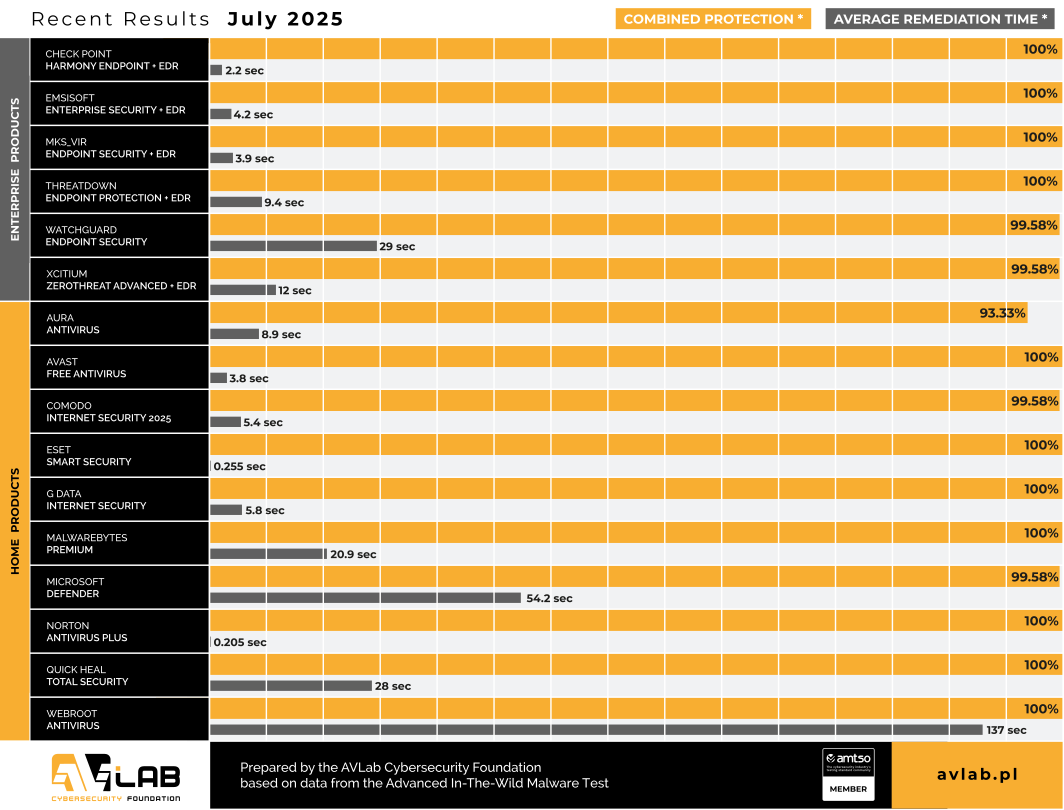
remediation time and results July 2025 1

When analyzing the results, it should be noted that the tested solutions had an active Internet connection and all available modules for scanning and classifying downloaded files. Some of the solutions block the file in the browser until the cloud analysis is complete, while others rely on the file’s reputation and, in the case of low popularity, monitor its behavior until the first suspicious behavior occurs, such as connecting to a C&C server or saving files to the TEMP directory.

The Advanced In-The-Wild Malware Test series reflects the actual effectiveness of the software in protecting against threats downloaded from the Internet via a browser. However, it should be noted that the level of protection may vary slightly in situations where the threat enters the system through a different vector, such as email, instant messaging, USB devices, or network directories.

Some of the tested solutions failed to detect between one and several malware samples. In the case of Aura Antivirus, the solution is relatively new on the market, certainly with less experience than its competitors, so it is understandable that the engine is not yet trained enough to catch all popular threats found on the web. The insufficient number of Aura users may also have an impact on the result when it comes to collective protection – sharing telemetry data from devices with the developer. The results of Comodo and Xcitium are also surprising, as both solutions failed to block a single (same) threat that had previously been classified by the developer as a False Negative: incorrectly marked as safe in the developer’s cloud, which may have affected the global response for workstations.

Finally, it is worth adding that although a single incident may seem statistically insignificant, it may in fact represent a previously unknown 0-day threat. This type of attack is capable of bypassing the protective mechanisms of installed security software. Sometimes even the best technologies cannot match human error, which can result in system infection, data encryption, information theft, or other undesirable actions.

More about Advanced In-The-Wild Malware Test

The study is conducted six times a year and focuses on evaluating the effectiveness of security solutions in detecting and blocking malware operating in the Windows 11 environment. The aim of the study is to identify the strengths and weaknesses of the tested solutions in terms of detecting and neutralizing threats actively present on the Internet. The test is also accompanied by the collection of telemetry data, which allows for the analysis of the current threat landscape and the techniques most commonly used by cybercriminals in targeted and mass attacks.

About AVLab Cybersecurity Foundation

AVLab Cybersecurity Foundation is a respected organization operating within AMTSO (Anti-Malware Testing Standards Organization) and Microsoft Virus Initiative (MVI). It specializes in improving digital security through detailed testing and analysis of security solutions. AVLab experts use advanced and realistic methods to evaluate the effectiveness of security software in real-world threat conditions. The organization regularly updates its testing protocols to provide reliable and valuable cybersecurity reports, helping both individual users and businesses make informed decisions about protecting their systems.

Advanced In-The-Wild Malware Test

AVLab Advanced In the malware test COMP
guest
0 Comments
Inline Feedbacks
View all comments