Assessment of effectiveness of protection against in-the-wild threats in the Windows environment (September 2025)
17 October 2025
Since the last edition of the Advanced In-The-Wild Malware Test in July 2025, several significant changes worth noting have taken place in the methodology and threat landscape. New approaches, tools, and attack techniques used by cybercriminals are forcing security solution providers to adapt and evolve, just as testing laboratories are required to do.
Since the previous edition (see details) manufacturers receive extended logs from us, which additionally contain, among other things:
event tree (relationships between processes), operations involving the creation and deletion of files and registry keys,
commands executed in the console,
Information about the completion of the process,
creating alternative data streams (ADS),
loading a DLL library or module into a process,
network connections, DNS, C&C servers, and other network activities:
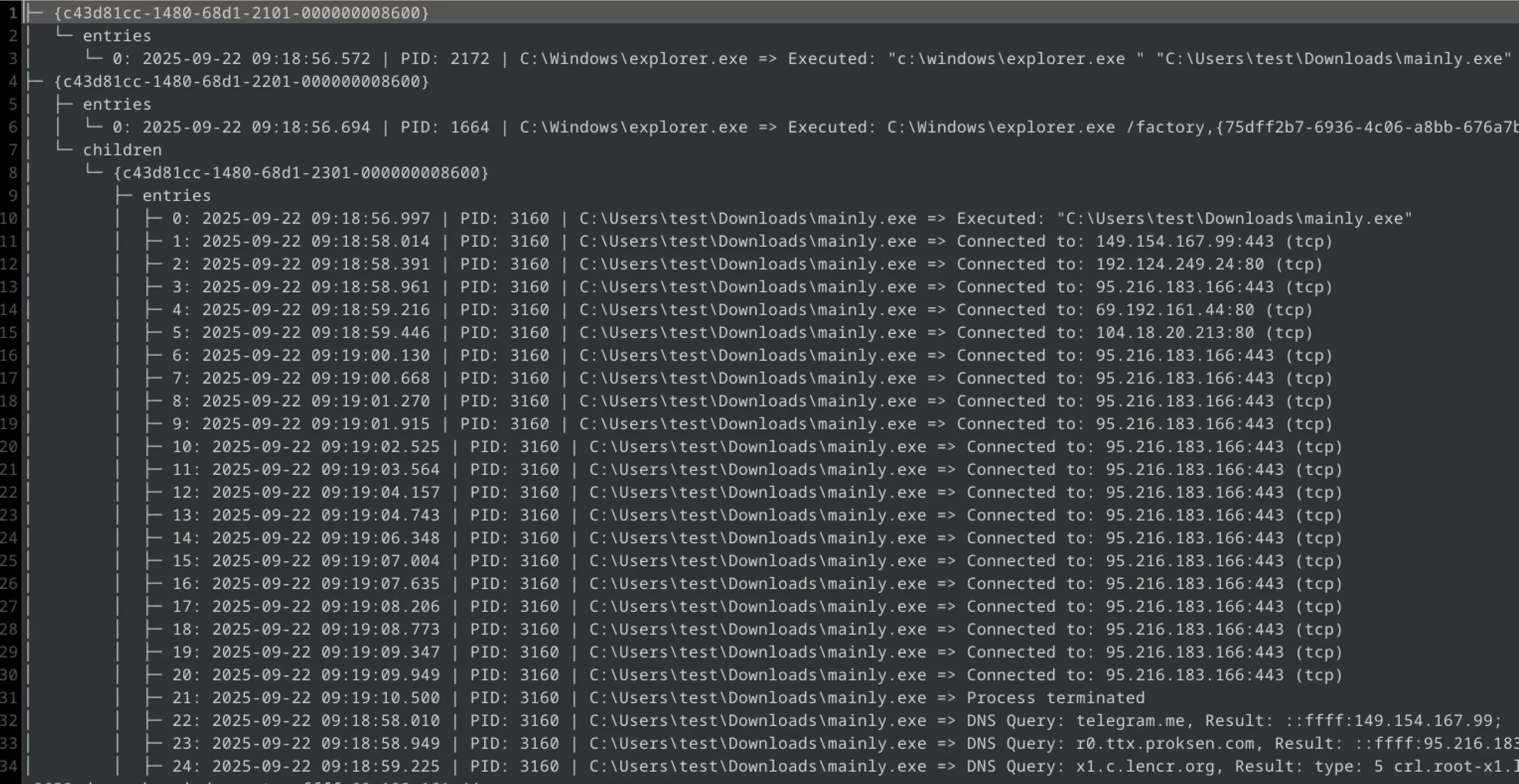
Example of one of the samples run in the test environment: here you can see the launch and attempt to connect (TCP) to an external resource on port 80, via an unencrypted channel.
It is worth noting that Microsoft is currently working on a new API for scanning AV-EDR outside the kernel in the Windows ecosystem (Windows Resiliency Initiative). At present, this does not affect our tests, but it may change vendor requirements and practices in the future, as well as the way we evaluate the solutions we test. At AVLab, we are preparing an update to our own monitoring and analysis tools. We want to be ready for the upcoming changes and provide manufacturers with detailed telemetry data while maintaining full test transparency.
Broader scope of LOLBins and TTP
Back in July 2025, we noted that malware was making extensive use of legitimate system tools (LOLBins) such as:
schtasks.exe (6,782 cases), rundll32.exe (5,984), svchost.exe, certutil.exe, powershell.exe, cmd.exe and so on.
The September test also included new tools and processes, such as Windows Sandbox components and dynamic libraries loaded into system processes:
WindowsSandboxClient.exe :: can be used to recognize the sandbox environment (anti-VM, anti-sandbox elements),
WindowsSandbox.exe :: no one runs this process in our environment, which may suggest malware activity.
vmmem.exe :: another process responsible for the virtual machine (Hyper-V),
WsbService.exe :: Windows Sandbox system service.
In the September edition, the test was expanded to monitor potentially new LOLBins created in Windows 11 updates and third-party tools known as “living off the cloud,” i.e., techniques where malware transfers some of its functions to the cloud or uses scripts in the cloud, e.g.:
					/az\.exe/ig,         // Azure CLI
/azcopy\.exe/ig,     // Azure storage transfer
/aws\.exe/ig,        // AWS CLI (common binary name)
/gcloud\.exe/ig,     // Google Cloud SDK CLI
/gh\.exe/ig,         // GitHub CLI
/git\.exe/ig,        // Git
/node\.exe/ig,       // Node.js (used to run JS from cloud)
/python\.exe/ig,     // Python (used to run scripts accessing cloud APIs)
In this article, we present only a selected list of processes and tools that we considered most important in the September edition in terms of “living off the cloud” techniques and new LOLBins in Windows 11. A complete, extensive list (several dozen items) is available to manufacturers.
System and test environment updates
In July 2025, testing was based on the latest Windows 11 builds and continuously updated applications. In September 2025, web components (browsers, plugins) are tested in zero-day versions, meaning updates are implemented on an ongoing basis during testing. The testing infrastructure has been made more “isolated” to prevent side effects of malware, such as “spreading samples” outside the testing system. In addition, starting with the November edition, we will slowly and gradually transition to Windows 11 25H2.
September 2025 test results
When analyzing the test results, it should be noted that all tested solutions operated in an environment with an active Internet connection and with all modules responsible for scanning and classifying downloaded files enabled.
Some security products block the downloaded file in the browser until the cloud analysis is complete, while others rely on the file’s reputation and, if it is not very popular, monitor its behavior until the first signs of malicious activity are detected, such as connecting to a C& C server, modifying the registry, or saving files in a temporary directory (TEMP).
The Advanced In-The-Wild Malware Test series reflects the actual effectiveness of protection against threats downloaded from the Internet via a browser. However, it should be noted that the level of protection may vary in situations where malware enters the system through other channels, such as email, instant messaging, USB drives, or shared network resources.
Details regarding unblocked threats have been reported to individual manufacturers.
What solutions did we test in September 2025?
What settings do we use?
During testing, we always run all available protection modules, including:
real-time scanning,
reputation mechanisms and cloud analytics,
network traffic control,
behavioral analysis,
EDR-XDR modules,
if possible, a dedicated security extension for your browser, which plays a key role in blocking threats from the Internet.
Policy toward PUP/PUA
Although we avoid PUP and PUA samples (potentially unwanted applications that are not fully malicious) in our tests, we recommend enabling protection against these types of threats. This feature allows you to block software that may interfere with the operation of your system or browser, even if it is not formally classified as malware.
In all tested products, we always activate the PUP/PUA protection feature.
Incident response and configuration
We configure each tested protection program so that (where possible) it automatically responds to incidents: blocking, removing, or repairing the effects of threats. All such actions are logged and analyzed using dedicated testing software, which enables detailed correlation of events (e.g., file blocking, process isolation, registry entry deletion).
Transparency and configuration changes
Based on many years of experience, we have noticed that the default settings of most solutions are good, but they do not always guarantee maximum protection. Therefore, for complete transparency, we inform you about every configuration change, both those made to increase the effectiveness of protection and those resulting from the manufacturer’s recommendations. However, it is worth noting that it is not always necessary or possible to change the settings, as some products do not offer additional configuration options.
Browser protection + automatic blocking for sandbox
Eset Smart Security
Default settings + browser protection
F-Secure Total
Default settings + browser protection
G Data Internet Security
Default settings + browser protection
K7 Total Security
Default settings + browser protection
Malwarebytes Premium
Default settings + browser protection
McAfee Total Protection
Default settings + browser protection
Norton Antivirus Plus
Default settings + browser protection
Quick Heal Total Security
Default settings + browser protection
Webroot Antivirus
Default settings + browser protection
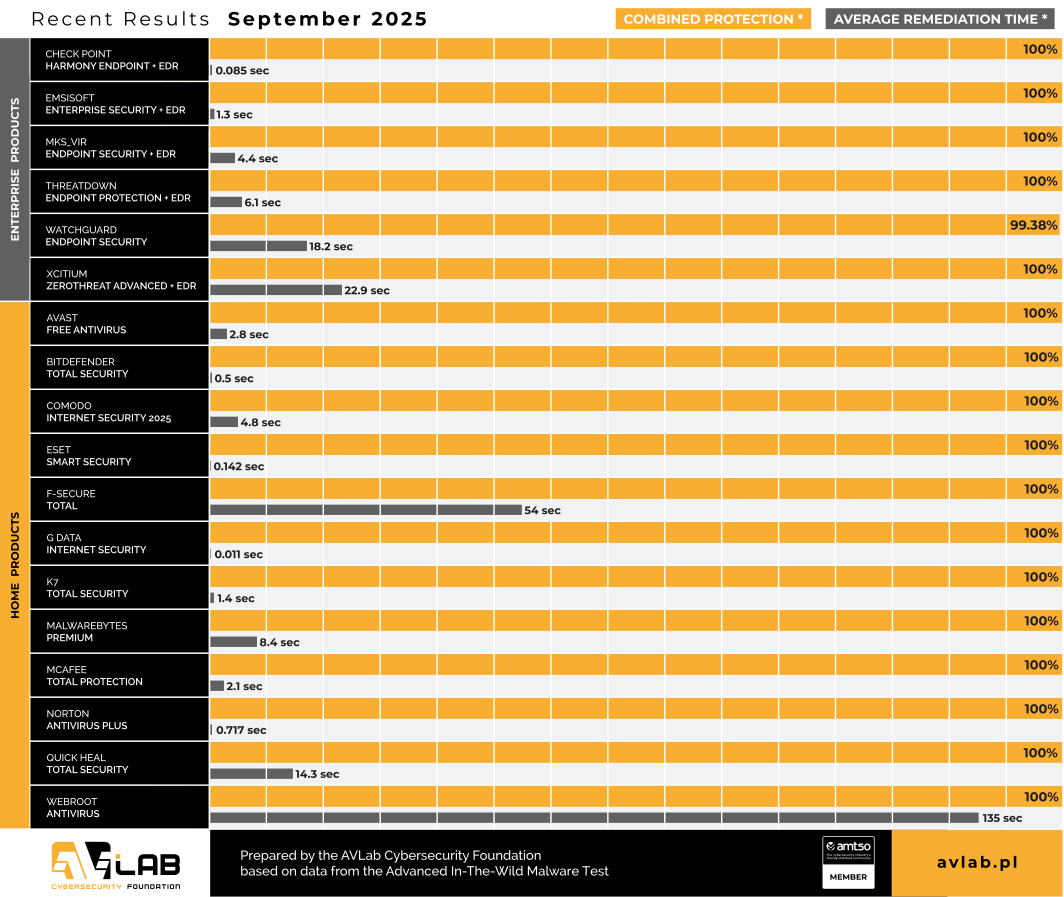
The September tests covered 18 solutions for both individual users and businesses. We observed that:
The average pre-execution effectiveness (blocking before execution) increased slightly for all vendors, mainly due to the emergence of derivative threats based on previously known malware families.
In the post-execution category, there are greater differences between manufacturers. Some still have difficulty identifying advanced techniques (e.g., in-memory, fileless, living-off-the-cloud).
Remediation time (the time needed to remove or neutralize the threat) becomes a key differentiator: manufacturers that have a fast automatic response (rollback, restoration) achieve significantly better protection ratings, but at the same time, in some solutions, detection is delayed until the malware performs network actions (C& C), i.e., it “survives” for several tens of seconds/several minutes in the system. This is not a bad thing, it is simply characteristic of the software in question.
It is crucial for users and administrators to choose security solutions with strong behavioral analysis, automatic rollback, and full telemetry, as well as to implement segmentation and restriction policies on the local network.
Advanced In-The-Wild Malware Test
How do we evaluate it and how long does it take?
During the calendar year, we conduct six editions of tests, which conclude with a comprehensive summary aimed at awarding prizes to the best solutions on the market. In each of the six editions, we evaluate the effectiveness of the tested security products for businesses and consumers, taking into account three key parameters:
PRE_EXECUTION
We assess whether the threat was identified and blocked at an early stage, before it was even launched. This may include blocking the website, blocking the downloaded file, or blocking the attempt to save the file when first accessing it.
POST_EXECUTION
We check whether malware that has been downloaded and executed on the system has been detected and stopped during more advanced analysis. This stage simulates the most dangerous scenario, i.e., a zero-day attack in which the malware has already been executed by the user.
REMEDIATION TIME
We measure the time that elapses from the moment a threat appears in the system to its complete removal and repair of the effects of the incident. This parameter is closely related to the previous ones and allows us to assess how quickly and effectively the software deals with eliminating threats.
More about Advanced In-The-Wild Malware Test
The study is conducted six times a year and focuses on evaluating the effectiveness of protective solutions in detecting and blocking malware operating in the Windows 11 environment. The aim of the study is to identify the strengths and weaknesses of the tested solutions in terms of detecting and neutralizing threats actively present on the Internet. The test is also accompanied by the collection of telemetry data, which allows for the analysis of the current threat landscape and the techniques most commonly used by cybercriminals in targeted and mass attacks.
O AVLab Cybersecurity Foundation
AVLab Cybersecurity Foundation is a respected organization operating within AMTSO (Anti-Malware Testing Standards Organization) and Microsoft Virus Initiative (MVI). It specializes in improving digital security through detailed testing and analysis of security solutions. AVLab experts use advanced and realistic methods to evaluate the effectiveness of security software in real-world threat conditions. The organization regularly updates its testing protocols, providing reliable and valuable cybersecurity reports that help both individual users and businesses make informed decisions about protecting their systems.