We are publishing a summary of the May edition of the Advanced In-The-Wild Malware Test, which aimed to assess the effectiveness of protection against modern malware threats. As part of the test, we also assessed whether the threat was blocked, and if so, at what stage of the attack chain the product responded—we evaluate this starting from the web layer and the file download stage, through to the execution of the malware and subsequent actions performed within the operating system, in accordance with MITRE ATT&CK techniques.
Another key element of the study is the remediation analysis, which involves removing the threat and reverting changes to the system. In this context, we refer to this as the “Remediation Time” parameter—it is the time required to fully restore the system to its pre-incident state (removing the malware, moving it to quarantine, and attempting to restore the system to its pre-infection state).
The diagram below should help illustrate the entire testing process for each malware sample:
–> from the attack initiation phase (download)
–> through the execution phase
–> to behavior-based analysis (runtime defense)
–> all the way to detection and neutralization:

Malware samples collected in the wild
An analysis of the samples used in this edition of the test shows that cybercriminals are using legitimate system tools (LOLBins) to evade detection and conceal their malicious activity.
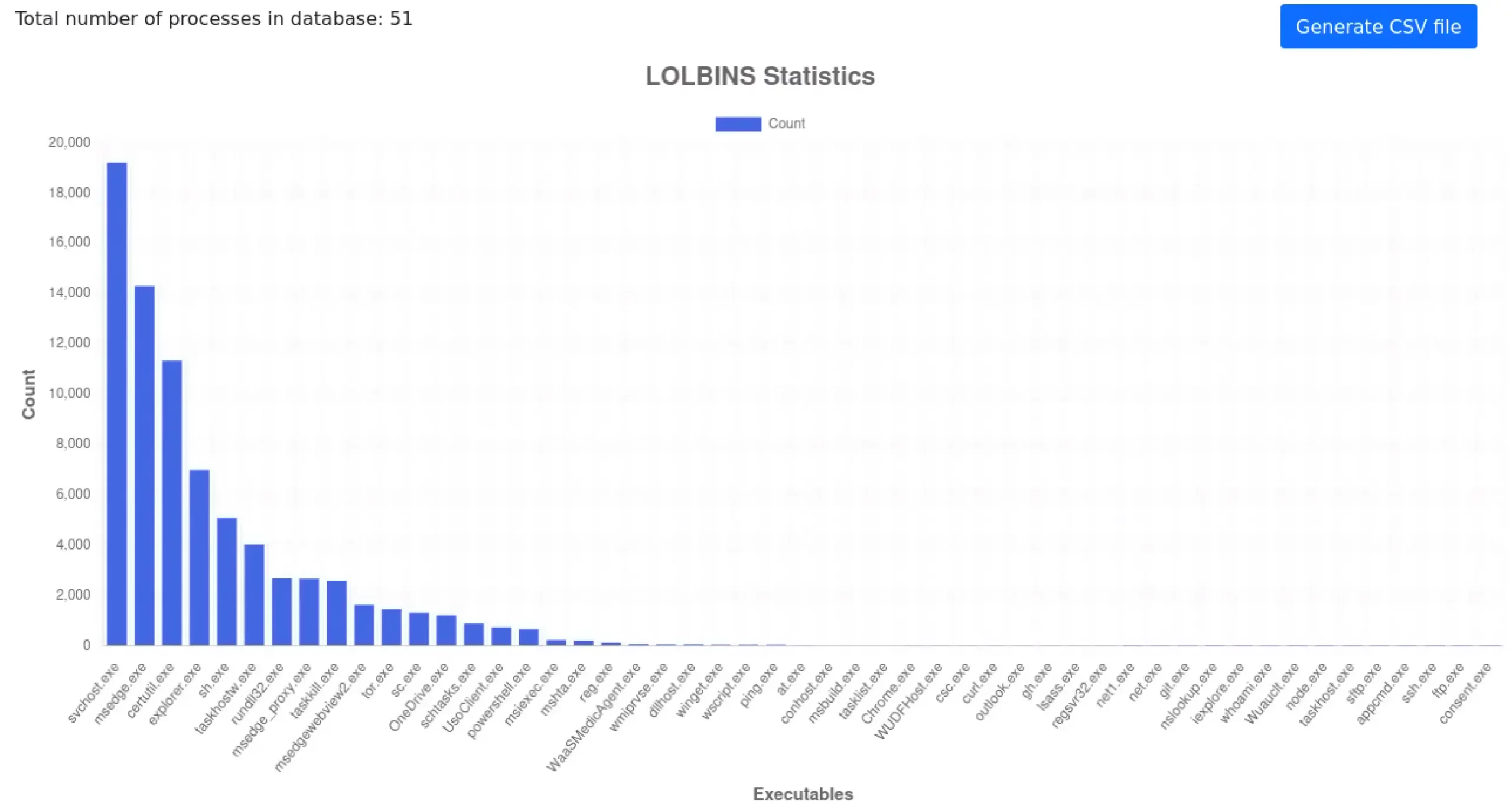
Among the most frequently observed components were certutil.exe, rundll32.exe, schtasks.exe, powershell.exe, reg.exe, wscript.exe, wmiprvse.exe, and regsvr32.exe. These tools were used to download files, execute code, carry out commands, and communicate with the attackers’ infrastructure. This trend confirms the growing importance of behavioral and telemetric analysis, as the mere presence of a legitimate process is not a sufficient indicator of a threat.
The analyzed samples also showed the use of less common tools. These included tor.exe, curl.exe, sftp.exe, ssh.exe, ftp.exe, nslookup.exe, git.exe, and msbuild.exe.
In the case of tor.exe, it is worth noting that 1,466 occurrences is a very high number: this legitimate process was used to anonymize network communication and hinder analysis of the infrastructure used by the attackers.
Native Coreutils tools in Windows
The presence of these legitimate, built-in Windows processes demonstrates that modern malware campaigns increasingly leverage both native operating system components and legitimate administrative and development tools to execute specific stages of an attack. It is also worth mentioning that Microsoft now enables native use of Linux commands on Windows thanks to the Coreutils tools—we will be examining these processes in future editions of the test.
An additional challenge for security solutions remains the use of encrypted HTTPS traffic and legitimate cloud services, which limits the effectiveness of mechanisms based solely on reputation or URL analysis.
To summarize this section—our methodology focuses on analyzing complete event chains, allowing us to assess not only the effectiveness of blocking but also the level of incident visibility, the quality of telemetry, and the ability to reconstruct actions performed on the system prior to the security response.
Methodology & AMTSO Compliance
The test methodology was developed in accordance with AMTSO guidelines. The test uses malware samples from actual campaigns intercepted by honeypot systems, which allows for the evaluation of protection effectiveness in scenarios that closely resemble real-world threats observed on the Internet.
The study focuses not only on blocking effectiveness but also on telemetry analysis, incident visibility, and the ability to reconstruct actions performed on the system prior to the activation of protective mechanisms.
Advanced In-The-Wild Malware Test
May Results (Round 3 of 6, 2026)
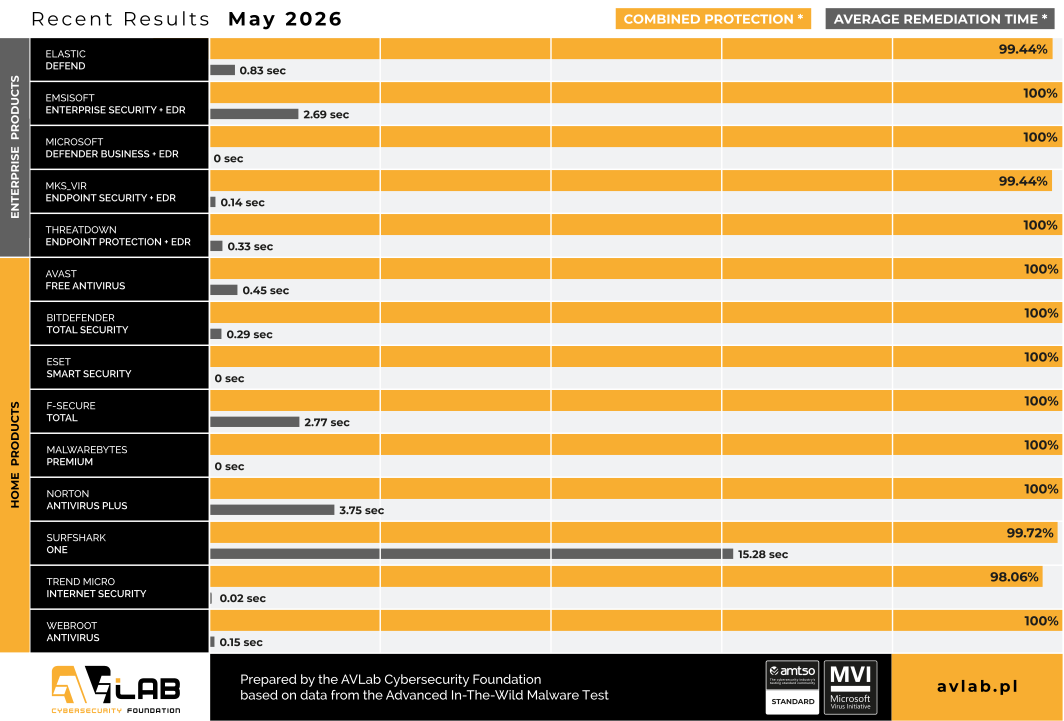
A few highlights from the test
Below are selected examples of telemetry and incident visibility recorded by the solutions under test. Depending on the product architecture and the level of telemetry integration, the solutions provided varying levels of detail regarding processes, parent-child relationships, command-line parameters, network communication, system changes, and event correlations between hosts.
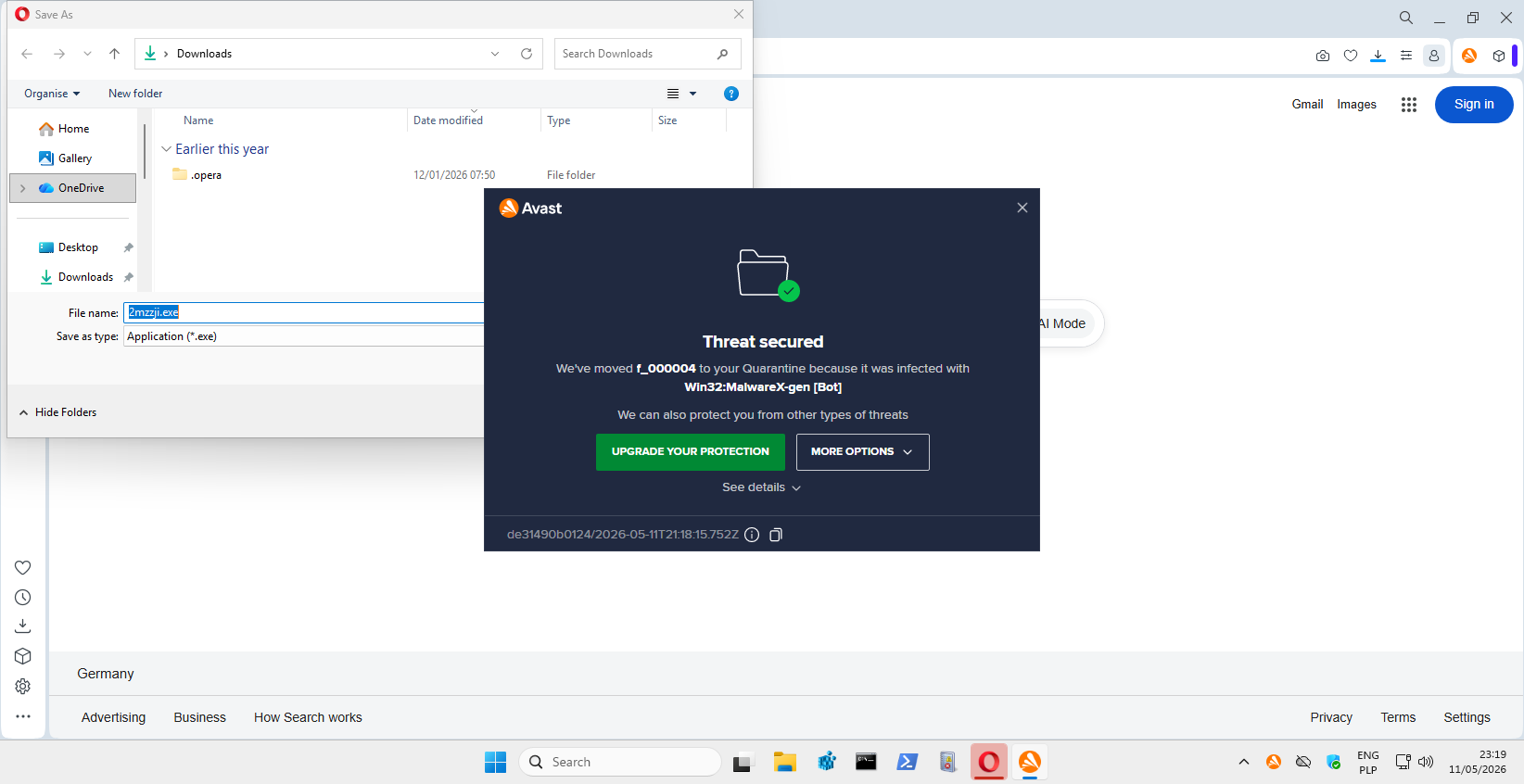
Avast One Free
Avast One Free (formerly Avast Free Antivirus) blocked the downloaded file at the Web-Layer Protection stage, meaning before it was even executed on the system. The threat was detected as “Win32:MalwareX-gen [Bot]” and automatically moved to quarantine. In the May edition of the test, this mechanism proved exceptionally effective, as Avast stopped 99.46% of all analyzed malware samples at this stage.
mks_vir Endpoint Security
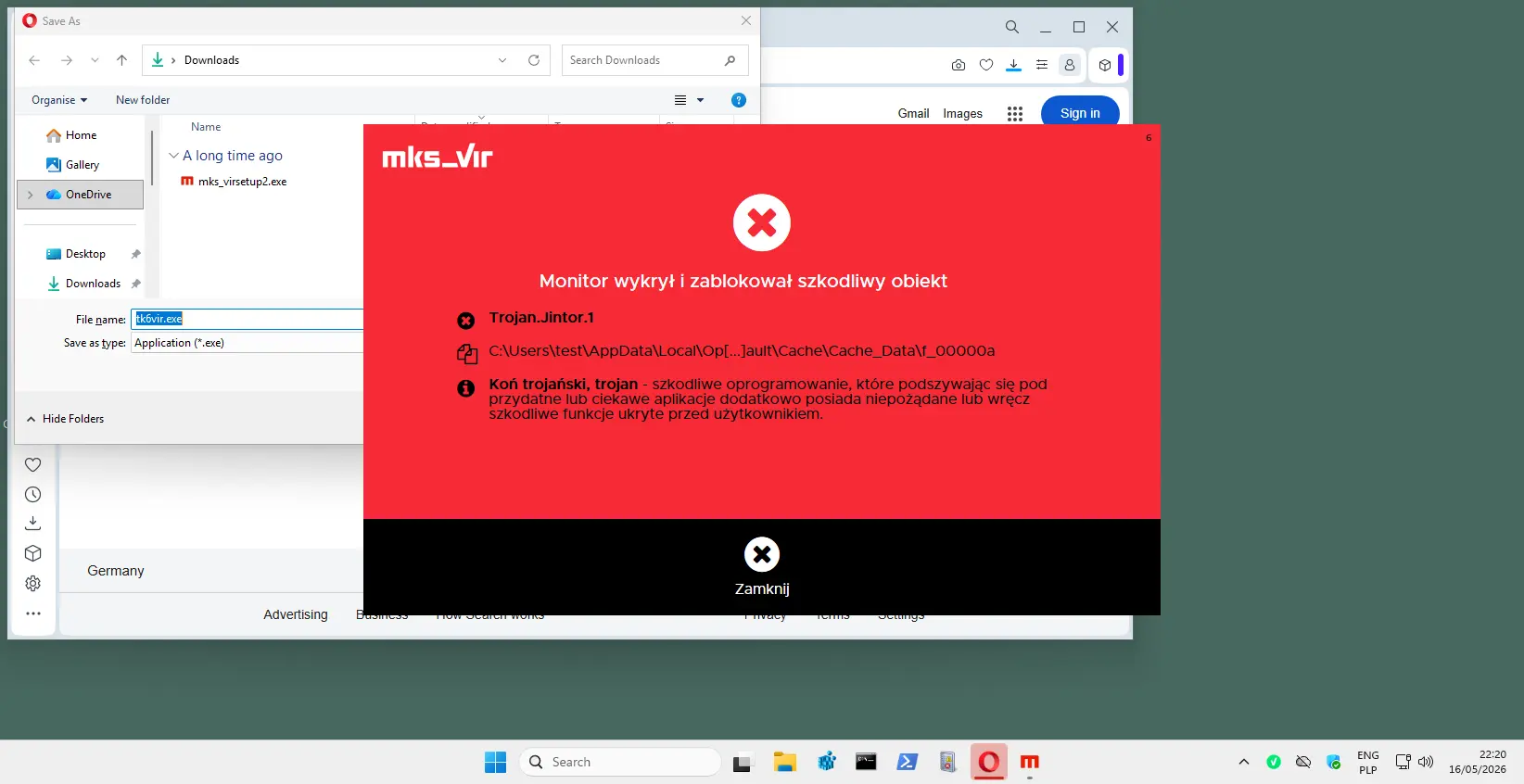
MKS_VIR blocked a total of 99.73% of threats at the Web-Layer Protection stage. In this specific case, it prevented a malicious file from being saved and executed on the system. The sample was detected as “Trojan.Jintor.1,” and the product notified the user of an attempt to download the malicious object.
ThreatDown Endpoint Protection with EDR
ThreatDown detected and blocked an attempt to communicate with infrastructure used by the threat. An alert was generated for an HTTPS connection to the domain femade[.]co[.]uk, initiated by the “opera.exe” process running under the “test” user account.
It is particularly important that the console displays not only information about the block itself, but also technical details of the incident, including the name of the process responsible for the communication, the IP address, the domain, the network port, and the sample’s cryptographic identifiers (MD5 and SHA256). Such data enables rapid verification of the incident as well as further analytical and threat hunting activities.
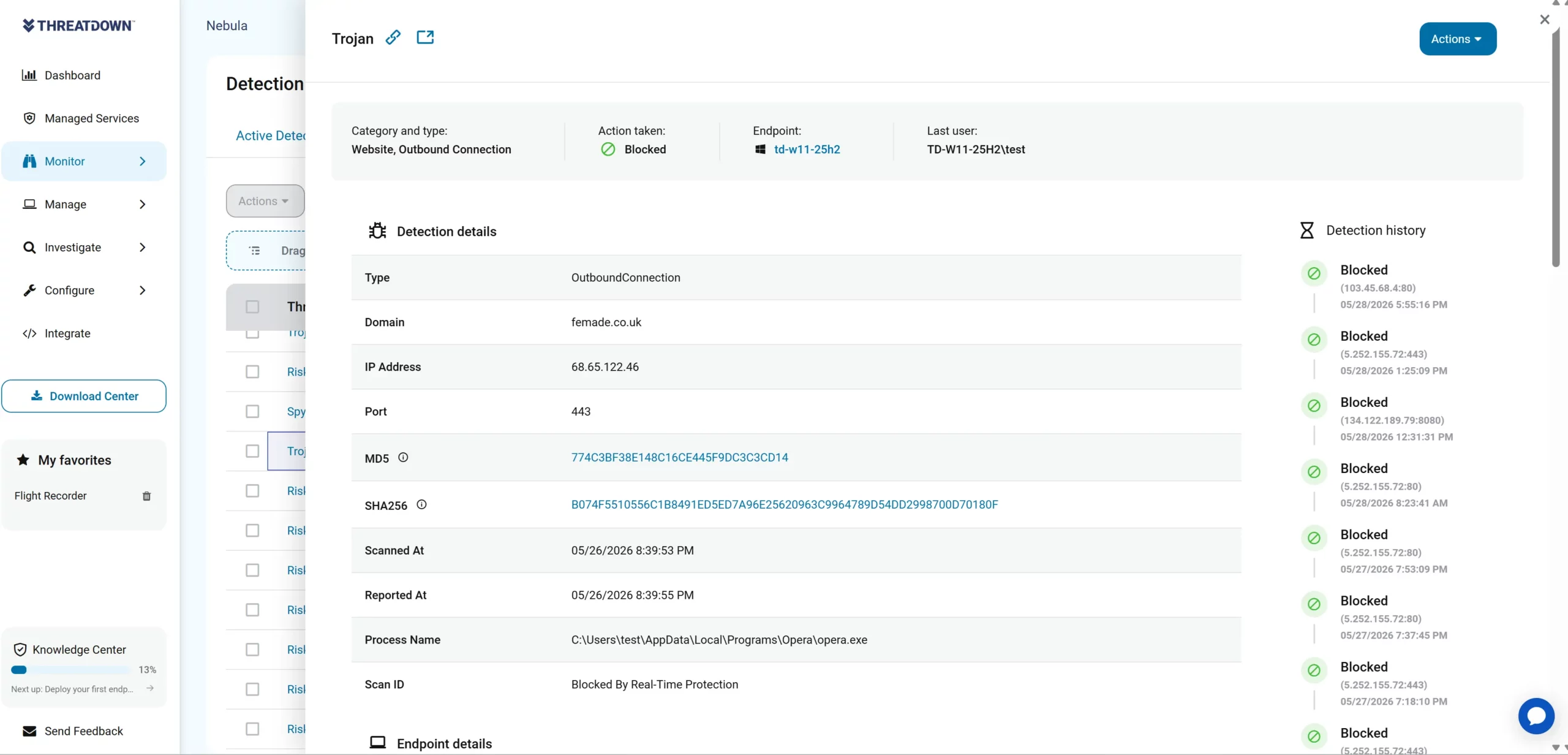
This is one of many examples of detection at the network communication stage, where the solution identifies an attempt to establish a connection with suspicious infrastructure and blocks it before the malware can carry out any further actions.
Emsisoft Enterprise Security with EDR
Emsisoft detected a threat based on behavioral analysis performed by the Behavior Blocker module. The executed file “kliulij.exe” was classified as “Likely Malicious” due to behavior characteristic of a downloader, and was then automatically stopped and remediated.
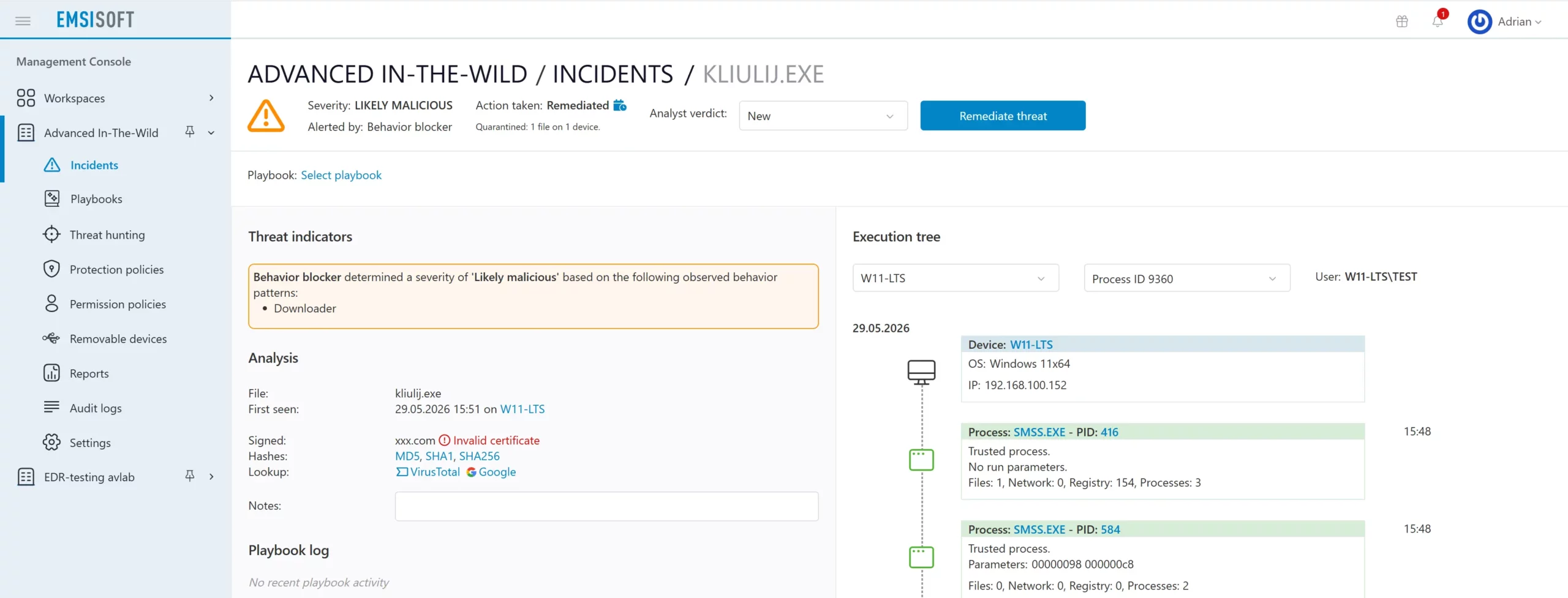
A particularly interesting feature of the console is the comprehensive Execution Tree, which allows users to trace the full context of an event. Analysts receive information about the initiating process, the user, launch parameters, file, network, and registry activity, as well as the relationships between processes that led to the detected threat.
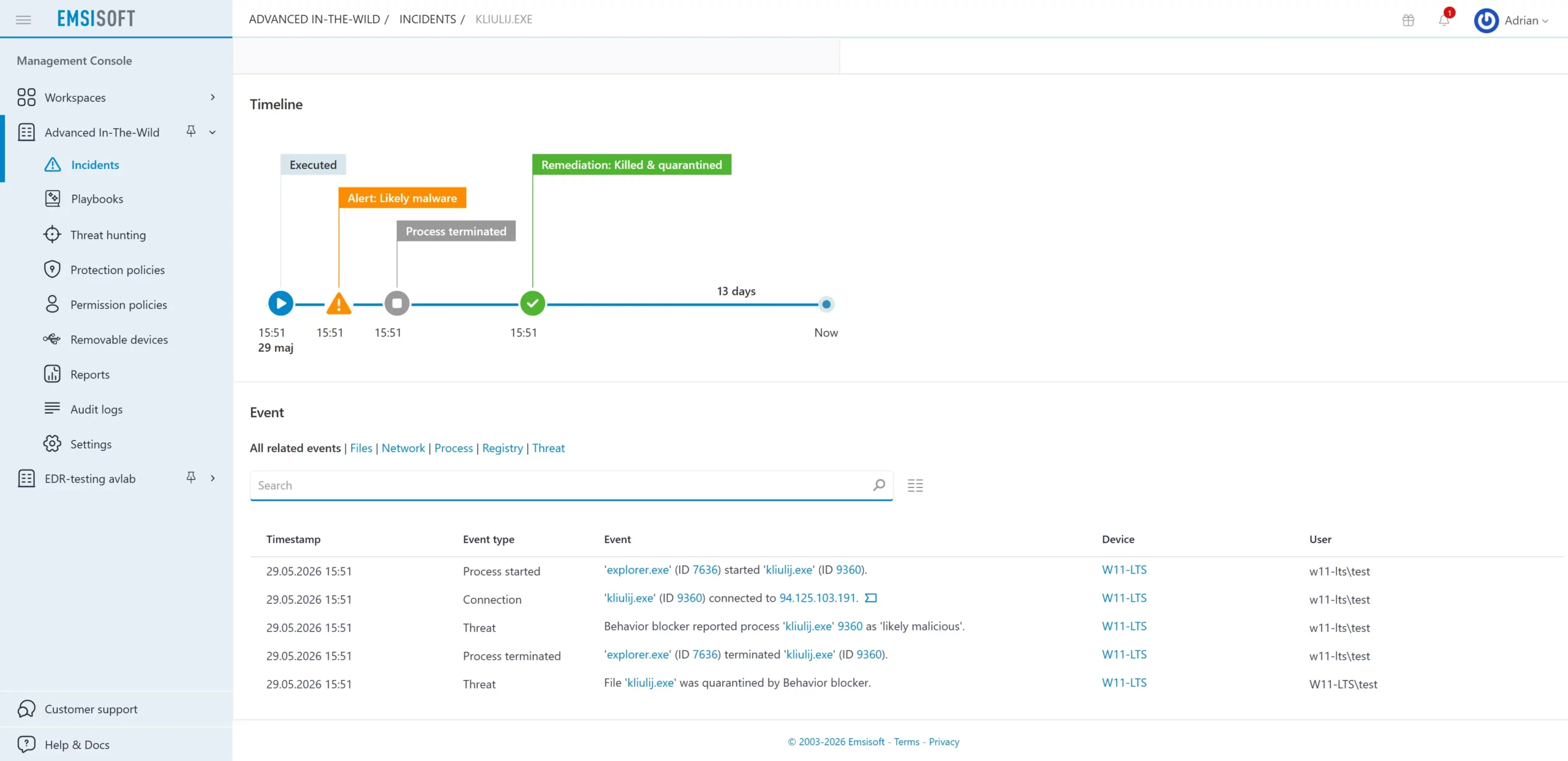
In the incident under analysis, Emsisoft identified that the file lacked a valid digital signature, flagged it as a tainted process, logged the network communication attempt, and then terminated the process and moved the sample to quarantine.
The incident timeline shows, in sequence, the execution of the file, the generation of an alert, the termination of the process, and the execution of remediation, which significantly facilitates the analysis of the attack’s progression and the evaluation of the product’s response effectiveness.
In summary of the May 2026
The May edition of the Advanced In-The-Wild Malware Test confirmed that modern security solutions are highly effective at blocking known threats as early as the file download stage. For many products, Web-Layer Protection played a dominant role, stopping most samples before they could execute on the system.
At the same time, observed threats are increasingly leveraging legitimate Windows components (LOLBins), encrypted HTTPS communication, and multi-stage attack chains. In such scenarios, detection alone is no longer the sole critical evaluation metric. The quality of telemetry, the ability to reconstruct an incident, and the speed of response and remediation are becoming increasingly important.
The analyzed solutions increasingly provide extensive event context covering processes, network communication, parent-child relationships, and detailed incident timelines. This allows not only for effective threat blocking but also for a faster understanding of the attack’s progression and an assessment of its potential impact on the system.
One could venture to say that the line between traditional antivirus and EDR-XDR solutions is gradually blurring. The effectiveness of protection is increasingly determined not only by the ability to detect malware, but also by the level of event visibility and the automation of remedial actions following incident detection.
Description of the configurations of the solutions we tested
We analyzed over a dozen Windows security solutions, covering both the consumer and business segments. The tested products featured a variety of detection models, ranging from classic signature-based mechanisms to comprehensive EDR-XDR platforms that utilize behavioral analysis and cloud support.
Enterprise Solutions

Elastic Defend + EDR
All Shields on Prevent mode + Attack surface reduction Enabled + collect all Events from workstation
Emsisoft Enterprise Security + EDR
Default settings + automatic PUP repair + EDR + Rollback + browser protection

Microsoft Defender for Business + EDR
Default policy + configuration settings („Block at First Sight” enabled + EDR in block mode

mks_vir Endpoint Security + EDR
Extended http/https scanning enabled + browser protection + EDR

ThreatDown Endpoint Protection + EDR
Default settings + browser protection + EDR
Solutions for Consumers and Small Business

Avast Free Antivirus
Default settings + automatic PUP repair + browser protection

Bitdefender Total Security
Default settings + browser protection

Eset Smart Security
Default settings + browser protection

F-Secure Total
Default settings + browser protection

Malwarebytes Premium
Default settings + browser protection

Norton Antivirus Plus
Default settings + browser protection

Surfshark One
Default settings + browser protection

Trend Micro Internet Security
Default settings + browser protection

Webroot Antivirus
Default settings + browser protection
Environment Configuration
What settings do we use?
During testing, we always run all available protection modules, including:
- real-time scanning,
- reputation mechanisms and cloud analytics,
- network traffic control,
- behavioral analysis,
- EDR-XDR modules,
- if possible, a dedicated security extension for your browser, which plays a key role in blocking threats from the Internet.
Policy toward PUP&PUA
Although we do not use PUP&PUA samples (i.e., potentially unwanted but not necessarily malicious applications) in our tests, we recommend enabling protection against this type of software as well. This feature allows you to block applications that interfere with the operation of your system or browser, even if they are not considered classic malware. We always activate the PUP/PUA protection option in all tested products.
Incident response and activity logging
We configure each product so that, if its capabilities allow, it automatically responds to threats: blocking suspicious activity, removing malicious files, or restoring modified system components. All these operations are recorded in detail and analyzed by our dedicated software, which allows us to correlate events such as file blocking, process isolation, or registry entry cleaning.
Transparency and product configuration
The default settings of most solutions are robust, but they do not always provide the maximum level of protection. That is why we report every change in product configuration, both those that increase the level of security and those that result directly from the developers’ recommendations. It is worth noting that some tools do not offer additional options, so it is not always necessary or possible to modify the settings.
Advanced In-The-Wild Malware Test - methodology, objective, and ccope of the study
Six rounds of testing are conducted throughout the year, and the results are compiled into an annual report on the effectiveness of security solutions. Each round includes products designed for both home users and corporate environments, and the evaluation is based on the full course of a real-world attack.
The analysis focuses on three complementary phases:
Web-Layer Protection (Pre-Execution) – we check whether the solution can block a threat before it is executed, including at the web layer, during file download, or upon the first attempt to access a malicious resource.
Runtime Defense (Post-Execution) – we evaluate the product’s response once the code has already been executed on the system. This stage reflects 0-day scenarios and fileless in-memory attacks, where runtime protection plays a key role.
Remediation Time – we measure the time and effectiveness of a full incident response, including threat neutralization and reversal of changes to the system. This metric shows how effectively the solution can restore the system to its pre-infection state.
The entire test allows us to assess how products respond to current attack techniques—both in mass-scale and more targeted scenarios. Simultaneously collected telemetry provides data for analyzing the current threat landscape, covering new infection vectors, methods of bypassing security measures, and changes in the TTPs used by cybercriminals.
Advanced In-The-Wild Malware Test